Skip to content
  • Categories
  • Recent
  • Tags
  • Popular
  • Users
  • Groups
Collapse
Forum Logo

VIDA 2014D/2015A Windows 11

Scheduled Pinned Locked Moved Others tutorials / Ostatní návody
vida
102 Posts 48 Posters 9.3k Views
  • Oldest to Newest
  • Newest to Oldest
  • Most Votes
Log in to reply
This topic has been deleted. Only users with topic management privileges can see it.
  • R Offline
    R Offline
    rasian666
    wrote last edited by
    #92

    Is it possible to enable old Java scripts so they are available exclusively to VIDA?
    21:33
    Yes, this can be done without restoring IE11 system-wide, but it requires tricking Windows 11 into providing the missing scripting engines and the appropriate Java environment for the VIDA address.
    Here are the steps to enable these features exclusively for VIDA:

    1. Forcing the old JScript engine (Essential for Win 11 24H2)
      In the latest versions of Windows 11, the system defaults to the newer, but less powerful, jscript9legacy.dll engine. VIDA requires the full functionality of jscript.dll. You can change this using the registry, which will restore the functionality of the program's buttons and menus: [1]
    2. Open Notepad and paste the following text:
      reg
      Windows Registry Editor Version 5.00
      [HKEY_LOCAL_MACHINE\Software\Policies\Microsoft\Internet Explorer\Main]
      "JScriptReplacement"=dword:00000000
      Use code with caution.
    3. Save the file as vida_fix.reg and run it (administrator privileges required).
    4. Restore VBScript as an "On-Demand Feature"
      Windows 11 has disabled VBScript by default, which VIDA scripts use to communicate with the database and DiCE. [1, 2]
      • Go to Settings > System > Optional Features.
      • Click View Features, type VBScript, and install it.
      • After installation, restart your computer. [1, 2]
    5. Java Isolation for VIDA
      VIDA 2014D works best with Java 7 Update 80 (x64). Instead of installing it globally (which can be dangerous), you can replace the files directly in the program folder: [1]
    6. Install Java 7u80 (found in the VIDA installation folder in JDK7u80).
    7. Navigate to the C:\Program Files\Java\jdk1.7.0_80 folder and copy its entire contents.
    8. Paste it into C:\VIDA\jdk, overwriting the existing files there.
    9. Uninstall Java 7 from the Control Panel – VIDA will now use its own local copy "hidden" in its own folder. [1]
    10. Configuring "IE Mode" in Edge (localhost only)
      For Java and ActiveX scripts to work, you need to configure Edge: [1, 2]
      • Open Edge and go to edge://settings/defaultBrowser.
      • Set "Allow reloading sites in Internet Explorer mode" to Allow.
      • In the "Sites in Internet Explorer mode" section, add: http://localhost/Vida/.
      • Important: This list expires every 30 days. To make it permanent, use the free "Enterprise Mode Site List Manager" tool from Microsoft.
    11. License Activation (Patch 2099)
      If the scripts load but you can't log in, your time-based license has probably expired (usually until 2017). Run the filldb.cmd file from the C:\VIDA\patch folder, which will update the SQL database and unblock access. [1, 2]
      In summary: The most important step for Windows 11 is adding VBScript to the optional features and changing the JScriptReplacement key in the registry, as these are the elements most likely to break after system updates. [1]
      After making the registry changes and adding VBScript, did the "Define Vehicle Profile" button start responding?
      Suggested next steps: If the VIDA Monitor icon still doesn't turn green, check the status of the SQL Server (VIDA) service on your system.
      Unfortunately, the same problem persists. I restarted my computer to make sure the registry was updated.
      10:18 PM
      If the registry and VBScript didn't help, it means the blocking is occurring at the Windows Script Host permission level or due to missing specific .NET libraries, which are disabled by default in Windows 11. [1, 2]
      Here's the last line of defense to unblock VIDA scripts:
    12. Unblock Windows Script Host
      The system may physically block the execution of scripts, even if they are installed.
    13. Press Win + R, type regedit, and navigate to:
      HKEY_LOCAL_MACHINE\SOFTWARE\Microsoft\Windows Script Host\Settings
    14. Check if the value is Enabled. If so, set it to 1. If it's not present, create a new DWORD (32-bit) value named Enabled and set its value to 1.
    15. Do the same in the path: HKEY_CURRENT_USER\Software\Microsoft\Windows Script Host\Settings. [1]
    16. Activating .NET Framework 3.5 (Critical)
      VIDA relies on older libraries that support Java-ActiveX communication.
      • Open Control Panel > Programs and Features > Turn Windows Features On or Off.
      • Make sure the .NET Framework 3.5 (includes .NET 2.0 and 3.0) option is selected (black square or check mark). If not, select it and allow the system to download the files from Windows Update. [1, 2]
    17. The "Dirty" Solution: IE Tab for Edge/Chrome
      If the built-in "IE Mode" in Edge fails, the IE Tab extension (available in the Chrome Web Store and Edge Add-ons) is the most effective way to "cheat" scripts. [1, 2]
    18. Install the IE Tab extension.
    19. In its settings, select IE 7 or IE 8 Standards Mode.
    20. Open the address http://localhost/Vida/ using the extension icon. This solution bypasses system-wide Java script blocks, creating a completely isolated environment within the browser.
    21. Checking the SQL Server Status
      If the page loads, but you can't click anything in the vehicle profile, make sure the database is running:
      • Type services.msc in the Start menu.
      • Locate the SQL Server (VIDA) service. It must be running. If not, right-click -> Properties -> Startup Type: Automatic and start it manually. [1]
      If the menu buttons still don't respond after these steps, the only fully effective way to install Windows 11 is to install a pre-built Windows 7 Virtual Machine (VM), as the latest Windows 11 security updates (especially 24H2+ versions) gradually remove the remnants of code that the old VIDA relies on. [1, 2]
      Is the VIDA Monitor icon in the system tray (next to the clock) green after activating .NET 3.5?

    The communication interface window still doesn't work.
    22:34
    Since the registry change regarding JScriptReplacement didn't work, the problem is most likely a blockage at the .NET Framework level or a specific registry setting called "Wow6432Node," which VIDA uses to display the communication window.
    Here's what you need to do to unblock the missing communication interface window (Communication Tool): [1, 2]

    1. Activate IE hosting in the .NET Framework (Key)
      This is the most common cause of a "blank" window or no response to selecting the DiCE device. [1, 2]
    2. Open regedit (Registry Editor).
    3. Navigate to:
      HKEY_LOCAL_MACHINE\SOFTWARE\Wow6432Node\Microsoft.NETFramework
    4. Right-click on the .NETFramework folder and select New > DWORD (32-bit) Value. 4. Name it exactly: EnableIEHosting
    5. Double-click it and set the value to 1.
    6. Repeat the same process in the path:
      HKEY_LOCAL_MACHINE\SOFTWARE\Microsoft.NETFramework (also add EnableIEHosting with a value of 1 here). [1, 2]
    7. Checking Java permissions in IE Mode
      Even if you have IE Mode enabled in Edge, Java scripts may be blocked by "Security." [1, 2]
    8. Open Control Panel > Internet Options.
    9. Go to the Security tab, select the Trusted Sites icon, and click the Sites button.
    10. Add the address: http://localhost.
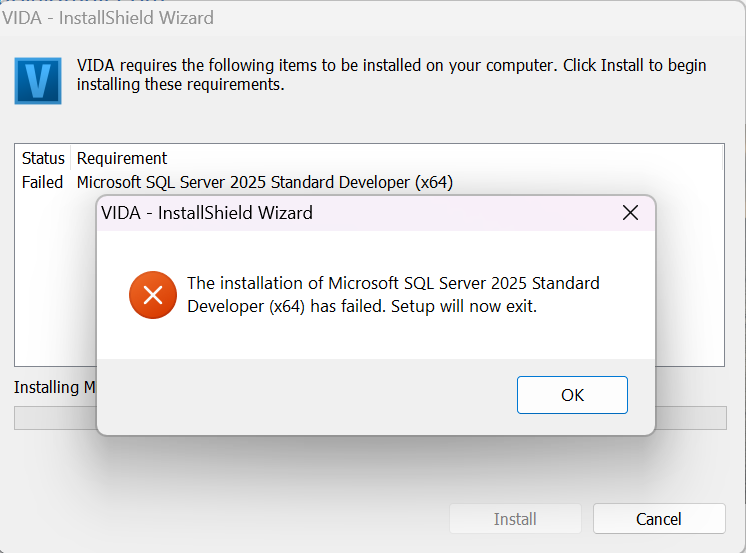
    11. Set the security level slider for "Trusted Sites" to Low.
    12. Click Custom Level and ensure that the options for ActiveX controls and scripting are set to Enable. [1, 2]
    13. Force a database refresh (DICE not visible)
      If the window is visible but blank (none to select), try resetting the database connection: [1, 2]
    14. Make sure the DiCE device is connected first to the car (so it has power) and then to the laptop's USB port.
    15. Run C:\VIDA\patch\filldb.cmd as Administrator. This will refresh the database entries that VIDA reads at startup. [1, 2]
      Why might this still not work?
      If the above steps fail, it means that your version of Windows 11 (probably 24H2) has completely disabled access to the jscript.dll engine in favor of jscript9legacy.dll, which does not support the old COM communication methods used by VIDA. [1, 2]
      Final Solution:
      After adding the EnableIEHosting value and restarting Edge (in IE mode), did any text appear in the Vehicle Profile section of the communication tool field?
      Tip: Check that you have .NET Framework 3.5 installed in "Windows Features," as without it, EnableIEHosting won't be able to function. [1, 2]

    It's worth remembering that the list of websites in IE mode in Edge expires by default after 30 days. If the buttons stop responding again in a month, simply add the http://localhost/Vida/ address back to Edge settings.

    1 Reply Last reply
    -2
    • R Offline
      R Offline
      rasian666
      replied to ZaanTerror last edited by
      #93

      @ZaanTerror with that virtual machine was copy paste mistake... it was one of most recomended way out;
      I put all conversation to word file, but I don't need to make it shiny...

      1 Reply Last reply
      0
      • Z Offline
        Z Offline
        ZaanTerror
        wrote last edited by
        #94

        Why would you do all this work with the risk of corrupting youre Windows Registery and having to install Windows again when my installer will have it up and running with a few clicks and max. 30 minutes of time. 😁

        1 Reply Last reply
        3
        • ilonapsheI Offline
          ilonapsheI Offline
          ilonapshe
          wrote last edited by
          #95

          Hey.
          I don't know what's wrong, but my VIDA has completely stopped reading cars (not a single one, including the one I tested).
          The situation is that after I checked whether VIDA was working and whether it was reading the car (a 2002 Volvo V70 P2), I turned off the laptop and simply put it on charge. The next day, my husband went to try diagnosing another car (a 2006 XC70 P2), and VIDA returned a reading error and automatically reloaded the page, after which the option to select a communication tool disappeared completely. We tried installing the program on the laptop, which had never had VIDA before. We installed VIDA and copied the necessary Scanmatic drivers from the old laptop (they're from 2011, so it should be CM2), but VIDA still refuses to read any of the above-mentioned cars. I also reinstalled the program on my laptop, but it didn't help.
          Any ideas on how to solve this problem?

          T5 T6 SchnappiT 1 Reply Last reply
          0
          • T5 T6 SchnappiT Offline
            T5 T6 SchnappiT Offline
            T5 T6 Schnappi
            replied to ilonapshe last edited by
            #96

            @ilonapshe No selection of the diag tool usually means you are not running VIDA in Internet Explorer or Edge with IE Mode.
            Do see the IE logo when VIDA is open?
            Screenshot (23).png

            ilonapsheI 1 Reply Last reply
            0
            • ilonapsheI Offline
              ilonapsheI Offline
              ilonapshe
              replied to T5 T6 Schnappi last edited by
              #97

              @T5-T6-Schnappi Yes, it doesn’t matter, if I go into VIDA through IE, Edge with mode or through VIDA monitor. Got screenshots from all 3.
              IE: ddc130cf-b856-4c9c-9190-0d8d47fbcd25-image.png
              Edge with mode:
              b9d551b8-8d5e-4ed0-ba42-bff2832ade83-image.png
              VIDA monitor at the bottom on the panel:
              884cf14b-b507-470b-90e1-6175c5dabd16-image.png

              T5 T6 SchnappiT 1 Reply Last reply
              0
              • T5 T6 SchnappiT Offline
                T5 T6 SchnappiT Offline
                T5 T6 Schnappi
                replied to ilonapshe last edited by
                #98

                @ilonapshe try this https://svdns.info/2024/11/20/communication-tool-dialogue-box-missing-again-weird-cause/

                ilonapsheI 1 Reply Last reply
                0
                • ilonapsheI Offline
                  ilonapsheI Offline
                  ilonapshe
                  replied to T5 T6 Schnappi last edited by
                  #99

                  @T5-T6-Schnappi okay, thanks. Gonna see what i can do

                  1 Reply Last reply
                  0
                  • T Offline
                    T Offline
                    T3stUs3rs
                    wrote last edited by
                    #100

                    Sent PM , please send Download link 🙂

                    1 Reply Last reply
                    0
                    • E Offline
                      E Offline
                      Eros
                      wrote last edited by Eros
                      #101

                      Thank you again ZaanTerror, I got the VIDA software working on my windows 11 with a clone mongoose scanner, but I think there's only 2 things that I would probably change because it took me a while to get it running, maybe add a step by step install guide (I know we just need to run the setup.exe, but it didn't work out for me) and possible fixes if something doesnt work like it should (in a .txt file)? I had some problems with my java, SQL and with the login screen saying the language I had installed didn't match the language I was trying to login with, but i was selecting all the right stuff, in the end I did manage to fix everything with the help of ChatGPT, maybe if I had installed it in a fresh windows it would've went just fine, but since mine and probably most people downloading it isn't I guess it would've been probably easier if there were some guide in fixing common errors or whatever, but thanks a lot again!

                      T5 T6 SchnappiT 1 Reply Last reply
                      0
                      • T5 T6 SchnappiT Offline
                        T5 T6 SchnappiT Offline
                        T5 T6 Schnappi
                        replied to Eros last edited by
                        #102

                        @Eros Install guides in english and german for clean installs can be found here
                        If you have any useful additions just let me know them.

                        If you want to replace an existing VIDA2014D installation, you need to fully remove that first. You have to stop and close VidaMonitor; stop all running SQL services; uninstall VIDA, Isoview, everything with SQL in it's name; reboot your computer; manually remove all folders containing the terms VIDA, Volvo, Ford, Isoview, SQL, Arbortext, also those that are hidden in various locations; check the Registry for leftovers and also delete them; reboot the computer again; then start ZaanTerrors Installer. Maybe I will write guide for this when I find the time and motivation to do it and add it to the install guides.

                        As a golden rule you shouldn't use your everyday computer for VIDA. It's better to use a dedicated machine for VIDA or create a Windows 2 Go USB drive and run VIDA from that, when your computer is already cluttered with all kinds of installed software.
                        The more stuff you have installed besides VIDA, the more things can and will interfere with it. Especially 3rd party antivirus/security softwares and the damages done to Windows by so called optimization/tuning softwares could give you a hard time trying to get VIDA up and running.

                        1 Reply Last reply
                        0

                        • 1
                        • 2
                        • 3
                        • 4
                        • 5
                        • 6
                        • Login

                        • Login or register to search.
                        All for your Volvo
                        • First post
                          Last post
                        0
                        • Categories
                        • Recent
                        • Tags
                        • Popular
                        • Users
                        • Groups
                        All for your Volvo