
Skip to content
  • Categories
  • Recent
  • Tags
  • Popular
  • Users
  • Groups
Collapse
Forum Logo

VIDA 2014D/2015A Windows 11

Scheduled Pinned Locked Moved Others tutorials / Ostatní návody
vida
264 Posts 141 Posters 74.0k Views
  • Oldest to Newest
  • Newest to Oldest
  • Most Votes
Log in to reply
This topic has been deleted. Only users with topic management privileges can see it.
  • M Offline
    M Offline
    Miki01
    wrote last edited by
    #261

    I installed VIDA, and the installation was successful. I had some problem with Port 40, but I managed to resolve them. I have another problem: my Super J2534 v1.5 device cannot connect to the ECU. When I plug it in, the lights on the instrument cluster start flashing on and off, and error messages appear on the odometer display.
    When I entered Devis Connection, I saw that it was a Super J 2534 is working on 36v.
    When I entered the diagnostics, this error window appeared.: “Communication error Please connect or test the communication tool.”
    Can somebody help me?
    Win11 26H
    S60 1.6deive 2012

    1 Reply Last reply
    0
    • D Offline
      D Offline
      dexx
      wrote last edited by
      #262

      Hi, installation was smooth, problem drop after rebooting.
      Vida Monitor was not started, I try run manually but I get this message:
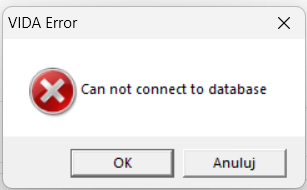
      aa680440-9c94-47ed-a556-42e98bf9b74d-image.png

      http://localhost/Vida/ - can not connect

      SQL server looks fine:

      2d1231f5-f305-4e19-9b51-fc0f807cd210-image.png

      I have Win 11 Pro, 24H2

      Any clue?

      Z 1 Reply Last reply
      0
      • Z Offline
        Z Offline
        ZaanTerror
        replied to dexx last edited by
        #263

        @dexx
        Uninstall but leave SQL installed.
        Reboot.
        Install again.
        Reboot and test.

        1 Reply Last reply
        0
        • L Offline
          L Offline
          LuxdeClan
          replied to LuxdeClan last edited by
          #264

          @LuxdeClan Thx for the link ZaanTerror
          I updated my laptop to the latest windows 26H2
          Hit the VIDA setup file and followed the guide and Vida works like
          a charm and Vdash. Had no problemes whats so ever.

          1 Reply Last reply
          1

          • 1
          • 2
          • 10
          • 11
          • 12
          • 13
          • 14
          • Login

          • Login or register to search.
          All for your Volvo
          • First post
            Last post
          0
          • Categories
          • Recent
          • Tags
          • Popular
          • Users
          • Groups
          All for your Volvo