
VIDA 2014D/2015A Windows 11
-
Hi!
This has been working like a dream, but recently stopped communicating with the car. Other parts still work like reading instructions, checking spare parts etc. I recently updated Windows 11 from 2025H2 to 2026H2.
Im using a Mongoose JLR bought from d5t5.Attaching screenshot from trying to press Diagnostics. The swedish parts translates to something like:
Cannot read the file or composition ... or one of its values. A Program Control Principal has blocked this file. (Exemption from HRESULT: 0x800711C7)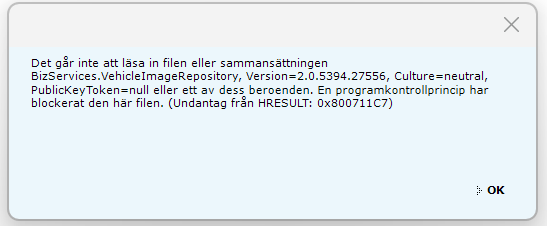
Windows also opens a browser tab informing about "Smart App Control".
Edition Windows 11 Pro
Version 26H2
Installdate 2025-12-09
OS-version 26300.9550
Functions Interfacepackage for Windows-functions 1000.26100.372.0Any known workarounds?
-
@ZaanTerror
Can you send me the link to nefeds@gmail.com -
This post is deleted!
-
sorry my email id: sdavidraj@gmail.com please share the link
sraj -
@ZaanTerror
Great work, impressive!Is it possible to get a download link?
Gloofer@me.com -
@frddtg said in VIDA 2014D/2015A Windows 11:
Hi!
This has been working like a dream, but recently stopped communicating with the car. Other parts still work like reading instructions, checking spare parts etc. I recently updated Windows 11 from 2025H2 to 2026H2.
Im using a Mongoose JLR bought from d5t5.Attaching screenshot from trying to press Diagnostics. The swedish parts translates to something like:
Cannot read the file or composition ... or one of its values. A Program Control Principal has blocked this file. (Exemption from HRESULT: 0x800711C7)Windows also opens a browser tab informing about "Smart App Control".
Edition Windows 11 Pro
Version 26H2
Installdate 2025-12-09
OS-version 26300.9550
Functions Interfacepackage for Windows-functions 1000.26100.372.0Any known workarounds?
Disable Smart app control entirely and try again? It had blocked different legacy software on my system.

