
Skip to content
  • Categories
  • Recent
  • Tags
  • Popular
  • Users
  • Groups
Collapse
Forum Logo

VIDA 2014D/2015A Windows 11

Scheduled Pinned Locked Moved Others tutorials / Ostatní návody
vida
272 Posts 146 Posters 75.9k Views
  • Oldest to Newest
  • Newest to Oldest
  • Most Votes
Log in to reply
This topic has been deleted. Only users with topic management privileges can see it.
  • D Offline
    D Offline
    dexx
    wrote last edited by
    #262

    Hi, installation was smooth, problem drop after rebooting.
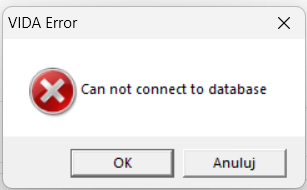
    Vida Monitor was not started, I try run manually but I get this message:
    aa680440-9c94-47ed-a556-42e98bf9b74d-image.png

    http://localhost/Vida/ - can not connect

    SQL server looks fine:

    2d1231f5-f305-4e19-9b51-fc0f807cd210-image.png

    I have Win 11 Pro, 24H2

    Any clue?

    Z 1 Reply Last reply
    0
    • Z Offline
      Z Offline
      ZaanTerror
      replied to dexx last edited by
      #263

      @dexx
      Uninstall but leave SQL installed.
      Reboot.
      Install again.
      Reboot and test.

      D 1 Reply Last reply
      0
      • L Offline
        L Offline
        LuxdeClan
        replied to LuxdeClan last edited by
        #264

        @LuxdeClan Thx for the link ZaanTerror
        I updated my laptop to the latest windows 26H2
        Hit the VIDA setup file and followed the guide and Vida works like
        a charm and Vdash. Had no problemes whats so ever.

        1 Reply Last reply
        1
        • O Offline
          O Offline
          OskariK
          wrote last edited by
          #265

          @ZaanTerror

          Hello.

          Could you send me the link to: oskarikallio11@gmail.com

          Thanks.

          1 Reply Last reply
          0
          • M Offline
            M Offline
            Mrgoodthing
            wrote last edited by
            #266

            Thank you so much ZaanTerror for the Vida software. I'm currently in the process of making a windows to go separate drive to house it, will report back when I finish that!

            1 Reply Last reply
            1
            • D Offline
              D Offline
              dexx
              replied to ZaanTerror last edited by
              #267

              @ZaanTerror Thanks for Your help, works fine !!!

              1 Reply Last reply
              1
              • X Offline
                X Offline
                XeptiQ
                wrote last edited by
                #268

                @ZaanTerror
                Would love to try this version out. 🙂

                1 Reply Last reply
                0
                • X Offline
                  X Offline
                  XeptiQ
                  wrote last edited by
                  #269

                  @ZaanTerror
                  Thanks for the link! Easy install and works like a charm. Will try to connect to one of my volvos and se how it performs 🙂 No problems , just install and a restart 🙂

                  1 Reply Last reply
                  1
                  • B Offline
                    B Offline
                    brewskiboy
                    wrote last edited by
                    #270

                    @ZaanTerror
                    I found my way here this evening looking for help installing VIDA, would you be kind enough to share the Win11 version please.
                    brewer76@gmail.com

                    1 Reply Last reply
                    0
                    • S Offline
                      S Offline
                      Slevin
                      wrote last edited by
                      #271

                      Thank you, works perfectly.

                      1 Reply Last reply
                      1
                      • E Offline
                        E Offline
                        EvazX
                        wrote last edited by
                        #272

                        @ZaanTerror
                        Thank you so much for your work on this version of VIDA! It’s by far the best version I’ve tested so far. It runs really well on my computer, and I was even able to use it in my own language, which is a huge plus.

                        I haven’t done much testing yet, and I’m still troubleshooting communication between my MaxiFlash and the car, but my first impressions are excellent. Thanks again!

                        1 Reply Last reply
                        0

                        • 1
                        • 2
                        • 3
                        • 4
                        • 5
                        • 6
                        • 13
                        • 14
                        • Login

                        • Login or register to search.
                        All for your Volvo
                        • First post
                          Last post
                        0
                        • Categories
                        • Recent
                        • Tags
                        • Popular
                        • Users
                        • Groups
                        All for your Volvo