
Can't se pricing for fixes or the shopping cart in VDASH (latest version)
-
Hi!
I am trying to "fix" SRS CFFF error on volvo c30 2009 1,8f.
After booting vdash it recognizes the car and shows I have an error with the SRS CFFF, which was caused by a bad battery that has since been replaced.
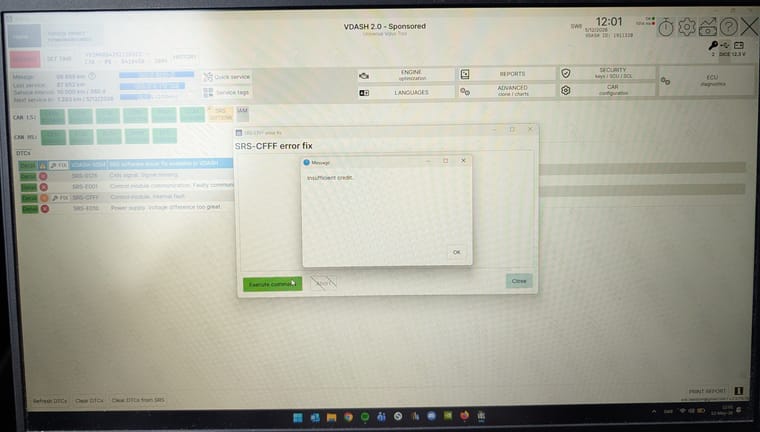
When I click the "fix" button an empty window pops up which says "execute command". Clicking this only answers that there are "insufficient credits". But I can't see the shopping cart with the pricing after clicking fix like others can as I've seen in youtube videos and pictures of vdash in use.
I have tried making another account, uninstalling and reinstalling v-dash, loading in minimum amount of credits to try to trigger the shopping cart. It says with my account type that I will see ads but I have not seen any ads, if that tells anyone anything. Wrong account type for home personal use with just one car?
I have:
Free account (sponsored)
Latest version of VDASH v.2.5.115.76
DiCE adapter to usb
Latest drivers of DiCE from D5T5
Windows 11 with latest updateLink to SRS CFFF guide on D5T5: https://d5t5.com/article/srs-cfff
-
@Gosta the account type doesn't matter for this. You first have to fix everything and clear all other SRS codes before you can perform the SRS-CFFF fix. The price should be 99,- Euros. https://d5t5.com/article/subscription-types-prices
-
@T5-T6-Schnappi Thanks for the reply.
I clicked the "Clear DTCs" and the codes in the picture were the ones that were left. Both "Fix" buttons for VDASH-5004 and SRS-CFFF leads to the same "execute command" window that that doesn't bring up the basket and the pricing.
Do you mean I should press the "Clear DTCs from SRS"? I got warning signs when i pressed that and it said that you should really know what you are doing before clearing those (something about potentially exploding airbags).
-
@Gosta The warnings are there because it is possible that the airbags are firing by accident. Usually nothing like should happen. Delete the DTCs from outside the car and wear ear protection. Just in case...

The DTCs are most probapbly the result of the low battery, but as your IAM seems to be offline/not communicating at all, you should first check all fuses.
You should also connect a charger/tender. 12,3V is way too low to programm your car.
And if you have any 3rd party antivirus/security/VPN program installed set it to permanently disabled and reboot the computer.

