
VIDA 2014D/2015A Windows 11
-
This post is deleted!
-
@ZaanTerror Hi, I need this app for my Volvo S60. In Chile, there’s no one who uses these products and I need it to repair and modify my car. please send it to this email cj.natio@gmail.com
-
I would like to receive thedownload link for the W11 upgrade please. Thanks in anticipation. Please send the link to my email address fredwlms44@gmail.com. Fred Williams
-
Big thanks to @ZaanTerror. Not a single problem with the installation on Windows 11 25H2. Checked the guides (quite useful honestly, specially for enthusiasts like I) but haven't plugged any car yet
-
Hi
I am having issues with the part catalog. Some diagrams have all the parts marked like the don't apply to this variant, even if they apply and are not discontinued. For example, my spark plugs (272207). Other part diagrams work fine.
Do anybody have the same issue?
Thank you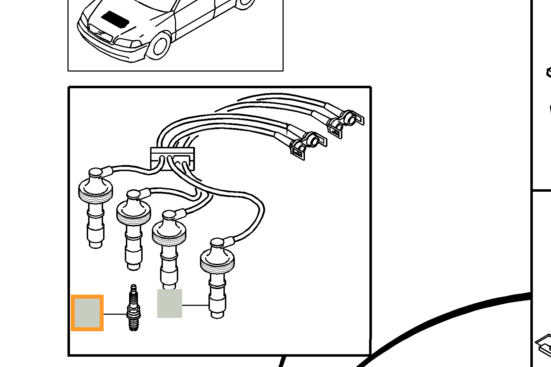
-
@ZaanTerror Hey do you still have the installer? Just got a mongoose cable and I'm looking to use it on my V50
-

Absolutely amazing installer with super fast delivery! Thank you very much @ZaanTerror
-
Hey @ZaanTerror, great work, could you fire me over a link please, I am looking to do a bare metal install to avoid running in a vm on a new car laptop. ty
-
@ZaanTerror Exactly, the issue is with an S40 I. Knowing it does not happen with other models, I'll play a little bit with the installation files.
-
Installed successfully, however vida monitor failed to start. Checked vida db logs and noted it was complaining about compressed files. Changed windows properties on vida folder to save uncompressed. Appreciated the repair function which seeded the databases. However I am stuck trying to login.
The language in the VIDA installation does not correspond to the language setting for your user name in VIDA Admin. Please contact your local administrator.
Please contact your local Helpdesk
I am logging in with EUR, tried Admin, same message. I selected eu-gb as the only language at install time. Maybe this isn't honoured during repair?
Thanks in advance, btw super slick installer. props
-
checked the fk in the languages table
SELECT TOP (1000) [Id]
      ,[LanguageCode]
      ,[Cid]
      ,[fkLexiconId]
      ,[Changed]
      ,[ObjVersion]
  FROM [AccessServer].[dbo].[Languages]
grabbed the fk for en-gb
updated the null fk for language for the users
UPDATE [AccessServer].[dbo].[Users] SET fkLanguage = '7ADADD64-4810-11D8-84F4-F09EEB920AF1';And I am logged in. Looking forward to testing with the car tomorrow. Thanks again!
-
May the peace, mercy, and blessings of Allah be upon you, Ameen.
I hope this message finds you all well. First, I would like to thank Allah and @ZaanTerror for the amazing software setup—the installation went smoothly without any issues.
I am troubleshooting a 2014 Volvo XC90 AWD D5 (D5244T18) and need some guidance.
Background & Timeline:
Engine Work: The engine was recently disassembled to replace the piston rings.
Initial Scanner & Injectors (Launch): Right after the engine overhaul, a Launch scanner reported DTCs related to 3 injectors. We replaced the injectors, but the hard-starting issue persisted (the engine only starts on the 2nd or 3rd attempt).
VDASH Scan: When reading with VDASH, the following codes were present:
P034100 (Camshaft Position Sensor Circuit Range/Performance)
CEM-9C03 (Antenna Ring Signal Missing)
Current VIDA Scan: Scanning with VIDA revealed a different set of communication codes:
CEM-DF17 – CAN-H High-Speed Network Incorrect Signal
TCM-U000100 – High-Speed CAN Communication Bus
HCM-U012987 – Lost Communication With Brake Control Module (BCM)
CEM-9C03 – Antenna Ring Signal Missing
Additional Notes:
The battery is currently weak/degraded, and we have been jump-starting the car using a donor vehicle.
The engine hard-starting (2nd/3rd attempt) and the DTCs all started right after the piston ring replacement and head reassembly.
Has anyone experienced a similar issue? Could a pinched wiring harness/ground fault near the cylinder head or low voltage during cranking be pulling down the HS-CAN bus and triggering the CMP sensor error?
Any advice or troubleshooting steps would be greatly appreciated! -
@ibrahim-mz Hi, did they send you the installer? They still haven't sent it to me and I need it; could you send it to me, please?
-
@natito Yes, I received it, but I recommend sending a private message to @ZaanTerror.
-
Installation went well and provided guide was easy to follow. Vida seems to work even with my native language, except that zoom error with network view. Latest windows 11 and updates as of 9/2026. My cheap china jlr2534 pro cable doesn't seem to work with win 11 and it won't read anything with vida, i can see it with vida but can't read vin or won't connect with hand written vin. Also tested the cable with Vdash and it reads vin but won't connect further. Later tested both programs with my friends mongoose cable and it worked fine so i have to order new one. Very much thanks for this package!
-
Er Da en venlig sjæl da kan hjælp med at installer programmet på min computer. Via fjernstyring. Da jeg ikke kan få min til at gør det. Og har givet op nu. Den vil bar ikke en skid. Skiv på Mail glennknudsen1@gmail.com Vis du / jer. vil hjælpe mig. Til det har Vida Tester har.
 M.v.h Glenn
