Skip to content
  • Categories
  • Recent
  • Tags
  • Popular
  • Users
  • Groups
Collapse
Forum Logo

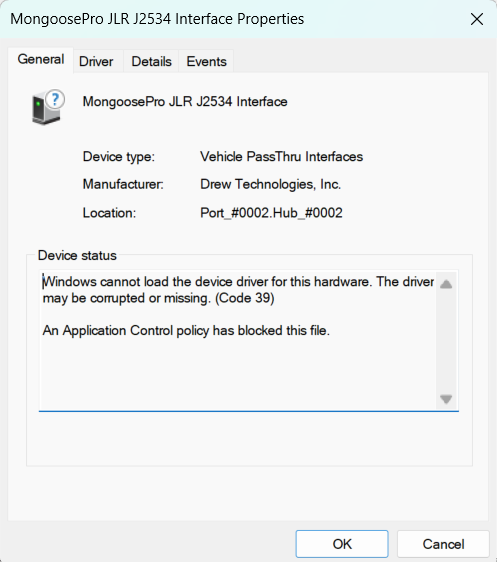
SUPER J2534 cannot runing, windows 11 latest update

Scheduled Pinned Locked Moved VDASH Troubleshooting / Problémy
9 Posts 5 Posters 235 Views
  • Oldest to Newest
  • Newest to Oldest
  • Most Votes
Log in to reply
This topic has been deleted. Only users with topic management privileges can see it.
  • N Offline
    N Offline
    Naim
    wrote last edited by
    #1

    Screenshot 2026-05-23 210505.png

    T5 T6 SchnappiT 1 Reply Last reply
    0
    • ilonapsheI Offline
      ilonapsheI Offline
      ilonapshe
      wrote last edited by
      #2

      Got the same issue on my personal laptop. And issue on clean windows 11 is that device is "in-use by other application/software"
      Dunno how those can be solved.

      1 Reply Last reply
      0
      • T5 T6 SchnappiT Offline
        T5 T6 SchnappiT Offline
        T5 T6 Schnappi
        wrote last edited by
        #3

        Have you already tried to simply reboot Windows? Sometimes the driver gets blocked after I used Vdash on some of my computers. A reboot solves this for me.

        1 Reply Last reply
        0
        • T5 T6 SchnappiT Offline
          T5 T6 SchnappiT Offline
          T5 T6 Schnappi
          replied to Naim last edited by
          #4

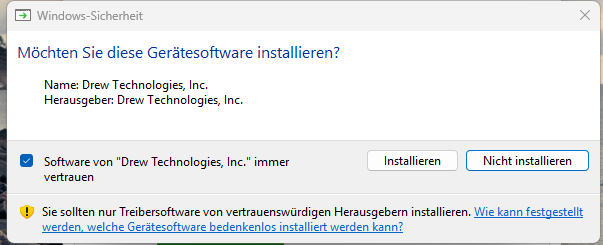
          @Naim uninstall the Mongoose drivers. Download and install the ones from here https://d5t5.com/sw/J2534_Driver_x64.msi
          and don't forget to tick the box in this dialogue
          119606.png

          1 Reply Last reply
          -1
          • E Offline
            E Offline
            EricJ
            wrote last edited by EricJ
            #5

            Same problem here. The driver is not trusted anymore by W11. D5T5 needs to provide the credentials for this to Microsoft.... D5T5, please help to fix this?

            T5 T6 SchnappiT 2 Replies Last reply
            0
            • T5 T6 SchnappiT Offline
              T5 T6 SchnappiT Offline
              T5 T6 Schnappi
              replied to EricJ last edited by
              #6

              @EricJ D5T5 can do nothing about this. The driver is made by Drew Technologies Inc.
              The Super J2534 as well as all other cheap Mongoose clones are unlicensed copies of the original Drew tech adapter. You will need to wait if they make a new driver and if it will work with clones. I would doubt that as this adapter is discontinued/out of support.
              Here is the link for the latest official Drew tech Mongoose driver. https://opusivs-marketing-downloads.s3.us-east-1.amazonaws.com/downloads/PastProducts/MongoosePro/JLR/J2534_MongoosePro_JLR_x64.zip dated 20.12.2023
              Don't use the drivers that came with the adapter if you got it from Ali or similar Shops.

              Feel free to test if it works with your adapter.

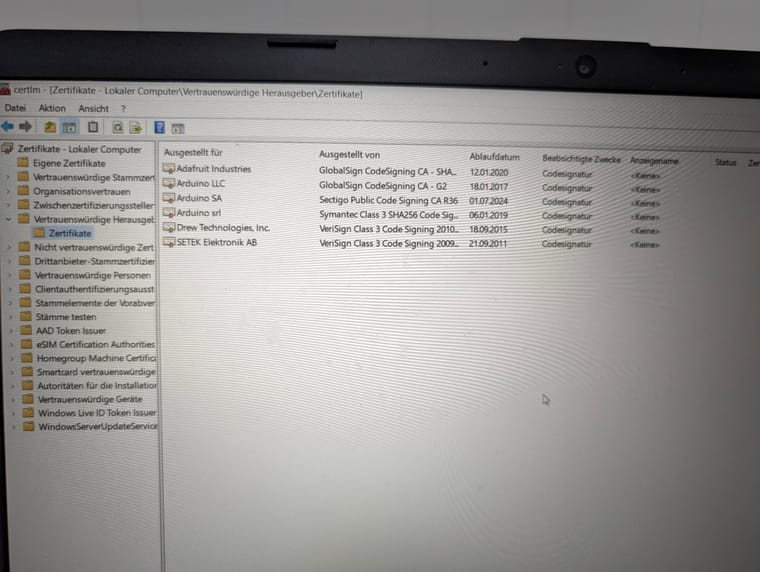
              You can also open the Windows start menu, type certmgr.msc and hit Enter to open the Certificate Manager and check if Drew Technologies is listet under Trusted Publishers.
              127527.jpg
              If this is not the case, you need to remove the drivers, maybe also the certificate under Untrusted Certificates, and reinstall them, and tick the box in the dialogue as I have posted it above.

              I'm using Win 11 25H2 fully patched, and the driver works.

              1 Reply Last reply
              0
              • T5 T6 SchnappiT Offline
                T5 T6 SchnappiT Offline
                T5 T6 Schnappi
                replied to EricJ last edited by
                #7

                @EricJ here is solution that might work https://svdns.info/2026/06/02/broken-mongoose-superj2534-windows-driver-fix/

                H 1 Reply Last reply
                0
                • H Offline
                  H Offline
                  Herving
                  replied to T5 T6 Schnappi last edited by
                  #8

                  @T5-T6-Schnappi
                  Have you tried this thread yourself and used it? i just went through it and every step of the download my computer is telling me it's a virus and i should not have downloaded it. but i did and it solved my issue. just wondering if it may cause me problems.

                  T5 T6 SchnappiT 1 Reply Last reply
                  0
                  • T5 T6 SchnappiT Offline
                    T5 T6 SchnappiT Offline
                    T5 T6 Schnappi
                    replied to Herving last edited by
                    #9

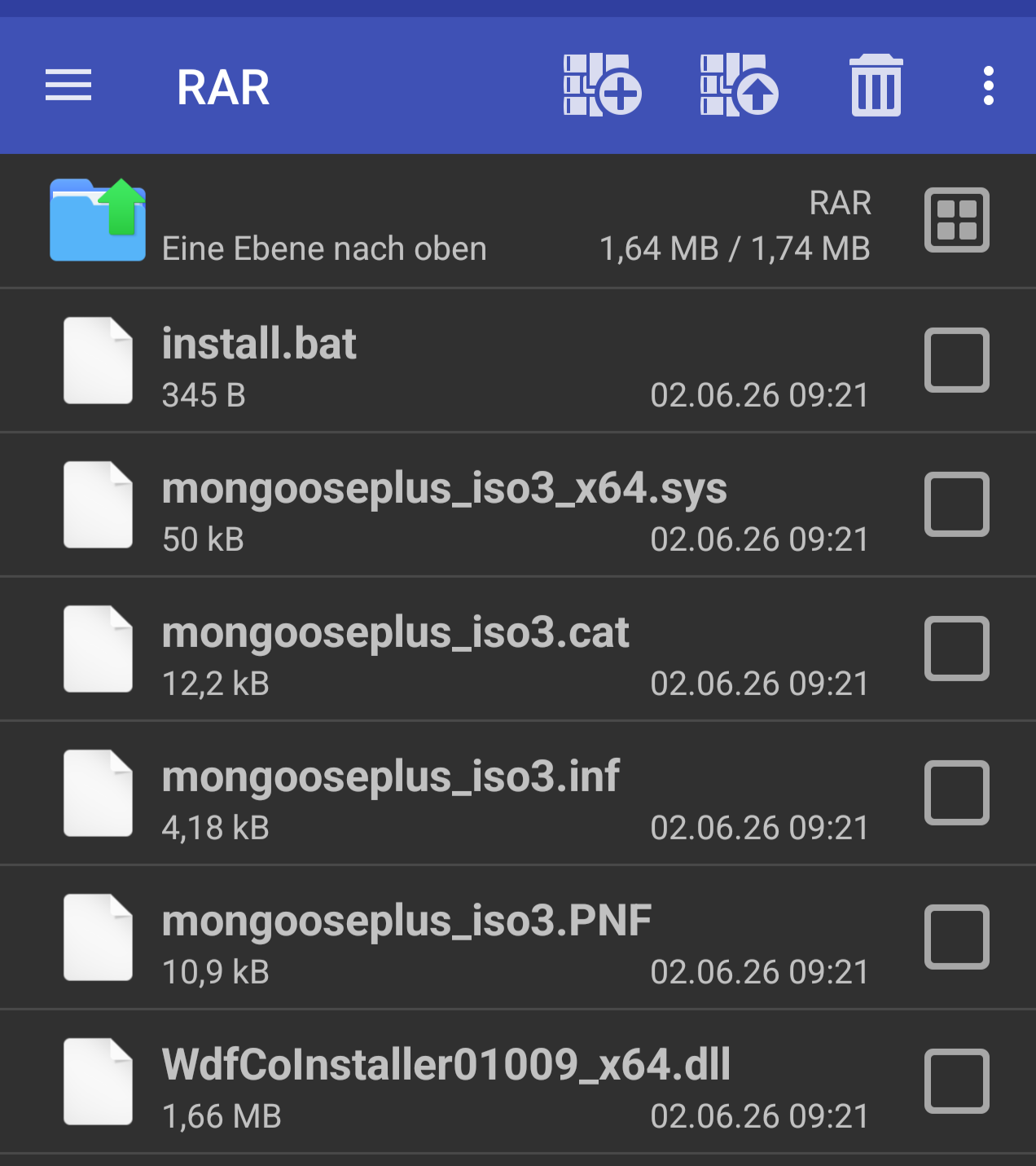
                    @Herving Of course I tried it first before I posted it here. The AV warnings are false positives. The update file is a self extracting archive which just installs the drivers from a Mongoose Plus ISO 3 on your computer. There is nothing harmful about that. But many AVs consider downloading .exe files from Google Drive as being suspicious, and also the behavior of the file is similar to some simple viruses. It creates a folder on drive C:/ and runs a .bat script with admin rights to install a new driver.
                    You can open the .exe with lots of programs like Winrar, 7-Zip or TotalCommander for example and you will see these files
                    128169.png
                    You can also simply unpack those files to a folder of your choice and run the .bat as administrator. The result will be exactly the same as running the exe.
                    If your AV allows to report false positives, you should report the file as being harmless.

                    1 Reply Last reply
                    0

                    • Login

                    • Login or register to search.
                    All for your Volvo
                    • First post
                      Last post
                    0
                    • Categories
                    • Recent
                    • Tags
                    • Popular
                    • Users
                    • Groups
                    All for your Volvo