
VIDA 2014D/2015A Windows 11
-
@ZaanTerror Do you mean 26H1/26H2?
I have just set up a new laptop with 25H2 and your latest version of VIDA. .NET was installed without needing to download the installer seperately. -
Yes 26H1 and later the .NET Framework windows feature is no longer included.
-
@ZaanTerror thanks for clarification.
Info added to the install guides -
How did you diagnose a 2018 ... in the list is only 2015-2016?
-
@volvov70freak after login in to VIDA you first open computer settings in the "Start" tab of VIDA and disable VIN decoding.
Than you open the "define vehicle profile" menu, check that "VIN decoding off" is written in red next to the VIN box,
Don't click on the read button!,
manually enter your VIN,
select your model,
select the latest model year available,
select your engine code, transmission and so on,
click on ok
Click on the Diagnostic tab and read your car as usual.
This only works on some P1s and P3s but not all.
If your engine isn't listed, you need to select a similar one which uses the same ECM hardware.
1.5 liter petrol engines and 7-speed automatic are not supported.
It's also described at the end of the install guides you can find here. -
Works like a charm, anybody how can help med with getting Logfiles for diagnotics, need to decode a ECM pin from a edc17cp22?
-
@VolvoAugust The log file method doesn't work since ages and was only used for the CEM pin. This was also never possible with the offline version of VIDA as this version isn't capable of software downloads at all.
The VIDA/Wireshark method also doesn't seem to work for ECM pins. Bench reading is the only option you have. Sorry. -
@ZaanTerror Can you send me the link to sergiy3710@gmail.com
-
Thank you for sharing the software. I have successfully installed it on my laptop running Windows 11 25H3. However, the Mongoose cable I purchased has not arrived yet. My engine is the B4154T4, and I'm concerned that there might be issues when I try to connect it later.
-
@V40 VIDA2014D/2015A can't be used on that engine. VIDA won't be able to communicate with that car. You will need to use Vdash for reading codes and accessing service functions. VIDA will be still useful for you, even without beeing able to connecting it to your car. You can manually specify a car that is most similar to yours and look up things like code descriptions and fault tracings, signal descriptions and pinouts for everything except the ECM., repair and install instructions, and so on....
-
Can you send me the link?
Thanks! -
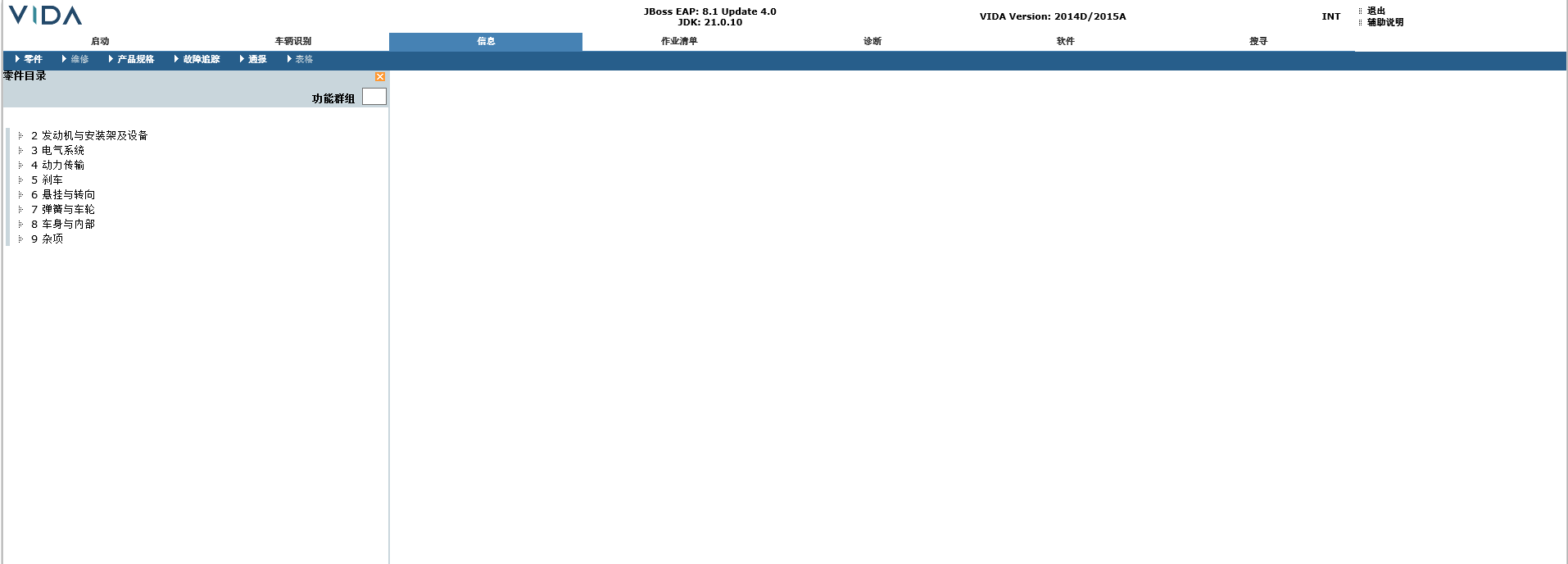
I have received my Mongoose data cable. After connecting it to the vehicle and VIDA, sure enough, it could not recognise the vehicle. However, it was able to read the vehicle's VIN code correctly, but it did not provide the correct options for selecting the vehicle's model year and engine type. So I manually selected a 2016 model year vehicle that is most similar to mine, and it was able to read the vehicle information and configuration correctly, as well as read the fault codes. However, I am not sure where I can view the vehicle repair and installation instructions. I have installed the Chinese version, and as shown in the picture, my "Repair" option is greyed out and cannot be clicked. Please help me.
-
@V40 after login into VIDA first go to computer settings in VIDA and disable the VIN decoding
Than go to define vehicle profile and check that something like VIN decoder off is written in red letters next to the VIN box
Don't click on "read"!
Enter your VIN
Manually define your car by chosing the latest model year, an engine most similar to yours, transmission and steering
Click on OK
Check if the repair menu is availableIf this doesn't work you will need to uninstall VIDA and re-install it in another language. Some localizations are incomplete and lack some data for specific cars. English seems to be the most complete version.
-
@T5-T6-Schnappi Thank you. I followed your advice, uninstalled the Chinese version, and reinstalled the English version. Everything is now working fine, and I can access all the vehicle maintenance information. However, as a user in a Chinese-speaking region, I do find it a bit difficult to read these English maintenance manuals at the moment. But this is already good enough, and I can use translation software to read them.
-
@ZaanTerror poproszę o link na damian.hajduczenia@gmail.com