Skip to content
  • Categories
  • Recent
  • Tags
  • Popular
  • Users
  • Groups
Collapse
Forum Logo

VIDA 2014D/2015A Windows 11

Scheduled Pinned Locked Moved Others tutorials / Ostatní návody
vida
131 Posts 61 Posters 19.1k Views
  • Oldest to Newest
  • Newest to Oldest
  • Most Votes
Log in to reply
This topic has been deleted. Only users with topic management privileges can see it.
  • M Offline
    M Offline
    marconi63
    wrote on last edited by
    #63

    The program installed on a laptop and a desktop running Windows11 pro 25H2. It works without any issues.
    Thanks a lot.

    1 Reply Last reply
    1
    • R Offline
      R Offline
      rewned99
      wrote on last edited by
      #64

      Due to illness, I only got around to testing it now. I connected the car to Vida and it works both via VirtualPC in Vmware and on a physical NTB...
      It's great when it works without problems.

      1 Reply Last reply
      0
      • R Offline
        R Offline
        rewned99
        wrote on last edited by
        #65

        And yet...I compared it with the modified Vidov 2015A, where there is only a change to SQL2019 and everything is installed via scripts, not in one run...
        I am not a programmer. The responses are basically the same... But this one is easier to install... and works the first time... THANKS

        1 Reply Last reply
        1
        • O Offline
          O Offline
          otukka12
          wrote on last edited by
          #66

          Works fine after reinstalling windows. Wasn’t worked with previous setup. I think previous vida version was reason.

          1 Reply Last reply
          1
          • jbruijsJ Offline
            jbruijsJ Offline
            jbruijs
            wrote on last edited by
            #67

            @ZaanTerror I really would like to receive the link. Could you please send me this? inboxanoniem@gmail.com

            1 Reply Last reply
            0
            • Y Offline
              Y Offline
              Yurii bihun
              wrote on last edited by
              #68

              @ZaanTerror Can you send me the link to bihunyura@gmail.com?

              1 Reply Last reply
              0
              • T Offline
                T Offline
                teepee
                wrote on last edited by
                #69

                Installation on win11 laptop was a breeze. Thank you so much for sharing!

                1 Reply Last reply
                1
                • F Offline
                  F Offline
                  Fidda
                  wrote on last edited by
                  #70

                  Hi, can I please get a copy too? @ZaanTerror I would really appreciate it! Thank you so much

                  Johnpeter22759@gmail.com

                  1 Reply Last reply
                  0
                  • M Offline
                    M Offline
                    Mykoliukas
                    wrote on last edited by
                    #71

                    Instalation went smooth. Tested on xc60 2012 with DiCE. Works perfect! Thank you!

                    1 Reply Last reply
                    1
                    • L Offline
                      L Offline
                      LukeLucky
                      wrote on last edited by
                      #72

                      I just wanted to give a massive shoutout to the creator of this Windows 11 VIDA version.

                      I’ve been struggling with Win7 virtual machines for a long time just to keep my XC60 (2013) in check, but this build is a total game-changer. It runs flawlessly on my Win11 host—no more VM lag or USB passthrough headaches.

                      Everything works perfectly:

                      Seamless login (no issues there!).

                      Full access to all modules (CEM, BCM, PAM, etc. — all green and communicating).

                      Rock-solid stability with the DiCE interface.

                      If anyone is still hesitating: go for it. This is top-tier work that makes Volvo ownership much more enjoyable. Absolute legend! Thanks again!

                      1 Reply Last reply
                      1
                      • K Offline
                        K Offline
                        kvavra
                        wrote on last edited by
                        #73

                        @ZaanTerror Can you send me the link to k.vavra@seznam.cz
                        Thank you !

                        1 Reply Last reply
                        0
                        • ilonapsheI Offline
                          ilonapsheI Offline
                          ilonapshe
                          wrote on last edited by
                          #74

                          @ZaanTerror Can you please send me the link to ipshenichnaya6@gmail.com
                          Thank you very much!

                          1 Reply Last reply
                          0
                          • V Offline
                            V Offline
                            Vinalile
                            wrote on last edited by
                            #75

                            @ZaanTerror Is someone you really can trust, working like a charm, no issues, and no more vm struggles anymore! Big thank you sir!

                            1 Reply Last reply
                            1
                            • ilonapsheI Offline
                              ilonapsheI Offline
                              ilonapshe
                              wrote on last edited by
                              #76

                              Hi guys!
                              Maybe someone can help me somehow with the installation. Idk what I am doing wrong.
                              So basically my installation process stops with Microsoft SQL server 2025. I changed the .net framework 3.5 in optional features, but it didnt help. Then I decided to install the SQL server 2025 from the https://www.microsoft.com/en-us/sql-server/sql-server-downloads. Got the program work, but the VIDA installation still stops in the same place.
                              Thought maybe I can install everything from ISSetupPrerequisties. So i did that, even the SQL seems to work from there, but in main VIDA setup.exe it still stays as a requirment and when i start installation i got message
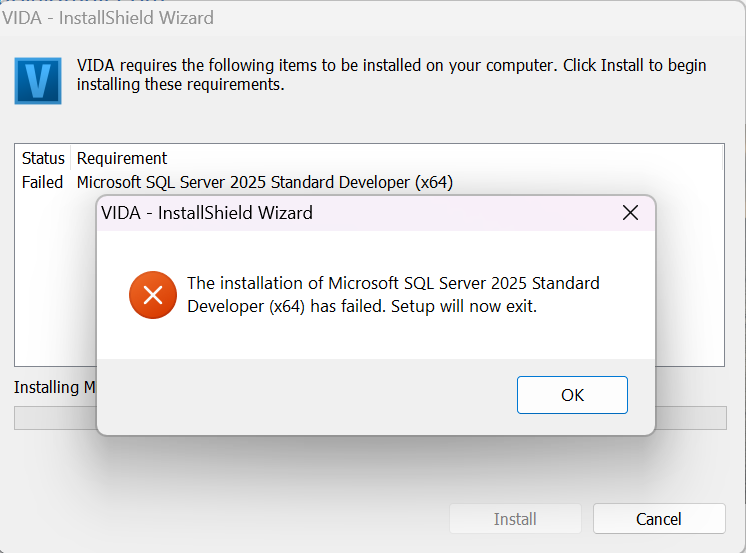
                              image.png
                              Can someone tell me what i need to do to get VIDA work with me?
                              Thank you

                              T5 T6 SchnappiT 1 Reply Last reply
                              0
                              • T5 T6 SchnappiT Offline
                                T5 T6 SchnappiT Offline
                                T5 T6 Schnappi
                                replied to ilonapshe on last edited by
                                #77

                                @ilonapshe what version of Windows are you running? Do you try to replace an older version of VIDA or is it a clean install?

                                ilonapsheI 1 Reply Last reply
                                0
                                • 3 Offline
                                  3 Offline
                                  314159
                                  wrote on last edited by
                                  #78

                                  Thank you very much, great job!
                                  Very easy installation of the program.

                                  1 Reply Last reply
                                  0
                                  • K Offline
                                    K Offline
                                    Kaaliperse
                                    wrote on last edited by
                                    #79

                                    Hello

                                    May i get the download link for this perhaps?

                                    BR
                                    Kaaliperse

                                    1 Reply Last reply
                                    0
                                    • S Offline
                                      S Offline
                                      Smuggler44
                                      wrote on last edited by
                                      #80

                                      Hi
                                      Could i get the download link 🙂

                                      Best regards
                                      Dawid

                                      1 Reply Last reply
                                      0
                                      • ilonapsheI Offline
                                        ilonapsheI Offline
                                        ilonapshe
                                        replied to T5 T6 Schnappi on last edited by
                                        #81

                                        @T5-T6-Schnappi It is a clean install on my personal laptop(work and one game). I have Windows 11 25H2

                                        T5 T6 SchnappiT 1 Reply Last reply
                                        0
                                        • T5 T6 SchnappiT Offline
                                          T5 T6 SchnappiT Offline
                                          T5 T6 Schnappi
                                          replied to ilonapshe on last edited by
                                          #82

                                          @ilonapshe try the following:
                                          press Windows-key+r and enter services.msc
                                          stop all SQL* services
                                          uninstall everthing with SQL in its name via control panel
                                          reboot the computer
                                          manually delete the folders "C:\Program Files (x86)\Microsoft SQL Server" and "C:\Program Files\Microsoft SQL Server"
                                          download the archive again (I send you a link via PM) and unpack it with the latest version of 7-Zip
                                          permanently disable any 3rd party Antivirus/Security software until VIDA is installed

                                          1 Reply Last reply
                                          0

                                          • 1
                                          • 2
                                          • 3
                                          • 4
                                          • 5
                                          • 6
                                          • 7
                                          • Login

                                          • Login or register to search.
                                          All for your Volvo
                                          • First post
                                            Last post
                                          0
                                          • Categories
                                          • Recent
                                          • Tags
                                          • Popular
                                          • Users
                                          • Groups
                                          All for your Volvo