VIDA 2014D/2015A Windows 11
-
Hi, can I please get a copy too? @ZaanTerror I would really appreciate it! Thank you so much
-
Instalation went smooth. Tested on xc60 2012 with DiCE. Works perfect! Thank you!
-
I just wanted to give a massive shoutout to the creator of this Windows 11 VIDA version.
I’ve been struggling with Win7 virtual machines for a long time just to keep my XC60 (2013) in check, but this build is a total game-changer. It runs flawlessly on my Win11 host—no more VM lag or USB passthrough headaches.
Everything works perfectly:
Seamless login (no issues there!).
Full access to all modules (CEM, BCM, PAM, etc. — all green and communicating).
Rock-solid stability with the DiCE interface.
If anyone is still hesitating: go for it. This is top-tier work that makes Volvo ownership much more enjoyable. Absolute legend! Thanks again!
-
@ZaanTerror Can you send me the link to k.vavra@seznam.cz
Thank you ! -
@ZaanTerror Can you please send me the link to ipshenichnaya6@gmail.com
Thank you very much! -
@ZaanTerror Is someone you really can trust, working like a charm, no issues, and no more vm struggles anymore! Big thank you sir!
-
Hi guys!
Maybe someone can help me somehow with the installation. Idk what I am doing wrong.
So basically my installation process stops with Microsoft SQL server 2025. I changed the .net framework 3.5 in optional features, but it didnt help. Then I decided to install the SQL server 2025 from the https://www.microsoft.com/en-us/sql-server/sql-server-downloads. Got the program work, but the VIDA installation still stops in the same place.
Thought maybe I can install everything from ISSetupPrerequisties. So i did that, even the SQL seems to work from there, but in main VIDA setup.exe it still stays as a requirment and when i start installation i got message
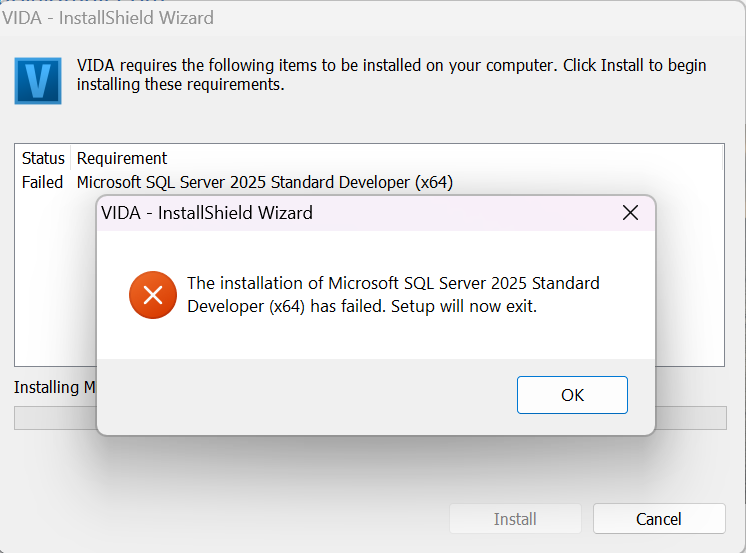
Can someone tell me what i need to do to get VIDA work with me?
Thank you -
@ilonapshe what version of Windows are you running? Do you try to replace an older version of VIDA or is it a clean install?
-
Hello
May i get the download link for this perhaps?
BR
Kaaliperse -
Hi
Could i get the download link
Best regards
Dawid -
@T5-T6-Schnappi It is a clean install on my personal laptop(work and one game). I have Windows 11 25H2
-
@ilonapshe try the following:
press Windows-key+r and enter services.msc
stop all SQL* services
uninstall everthing with SQL in its name via control panel
reboot the computer
manually delete the folders "C:\Program Files (x86)\Microsoft SQL Server" and "C:\Program Files\Microsoft SQL Server"
download the archive again (I send you a link via PM) and unpack it with the latest version of 7-Zip
permanently disable any 3rd party Antivirus/Security software until VIDA is installed -
The program installation issue was resolved. It turns out I needed to reboot the laptop before installing the SQL servers.
But apparently the obstacles aren't over for me. I have a Chinese clone of DiCE that I got with the previous VIDA program, which crashed on Windows 7. And for some reason, I can't run diagnostics on the car. The laptop sees DiCE, but I can't read the car. I installed Scanmatic (it was on the old laptop, and as far as I understand, DiCE used to see cars with it), but it didn't yield any significant results. Now DiCE is simply visible as a Scanmatic device, not "unknown," and in VIDA, I can now select CM2 USB/CM3 USB devices.
Can you tell me how to properly connect and configure the Chinese DiCE so I can start seeing cars? I'm just a girl in the world -
@ilonapshe As it seems, your DICE is a Scanmatic SMII in a DICE shell which is suboptimal in many ways. What car do you try to scan.
Select the CM2/CM3 in VIDA and click on read next to this. You need to log in with the correct market/partner group or your car won't be recognized/decoded.Could you please download and install Vdash and try to connect to your car with that. To see if your adapter is working. It's easier this way than with VIDA.
-
@T5-T6-Schnappi On win7 DiCE worked with CM2, but I dont know how that was installed on laptop or cofigurated. On win7 DiCE worked with v70 P2 2001-2008. Tried to scan that one
-
At first i had the exact same problem than @ilonapshe
My setup is a KVM/QEMU Win11 LTSC IoT Enterprise running on Arch host.
I tried to install the program from spice folder share on host, turns out the folder share doesn't like too big files so my error was there. Couldn't even copy the files from the shared folder to the guest. So i copied the files to USB drive and directed that to the guest, from there the installation was smooth sailing.Then i had the Vida couldn't start error because port 80 was in use. The error message was helpful and i found in the thread that @repeq had posted about stopping and disabling World Wide Web Publishing Service from the windows services.
After that everything seems to work nicely i still need to see how it works with my cheap chinese Dice but maybe i just get the J2354 as it would be better anyways.
Thanks for the great work you have done @ZaanTerror , this truely is the silver bullet to solve all Vida installing problems!
-
Hi Zaan
Cool work you did there!
can i have the download link for VIDA 2014D/2015A on Windows 11.
here is my email address
jpmorganlim@gmail.comthanks pal
-
@ilonapshe First you need to identify what adapter you actually have. DICE, Scanmatic, Mongoose or whatever. There are lots of chinese DICE shells with completely different non-DICE adapter hardware inside that are sold on chinese plattforms.
Connect the adapter to the car first, switch Ignition to POS.II (Ignition on/engine off), then connect the adapter to your computer. Then open device manager and see what is listed under "Vehicle Pass Thru Interfaces" or if there is an "unknown device". You also need to install the correct driver/software version if you have a scanmatic in your DICE shell. SM2 and SM3 use different software versions. SM3 software doesn't work for the SM2 and vice versa.