
@danielraistrick Then everything works as intended. ITP (Infotainment theft protection) detects a module that doesn't belong to your VIN and shuts down the whole Infotainment.
You need to decode the CEM pin, IMMO pin and Security pin with vdash, and than you can disable ITP.
Or you visit a Volvo dealer and ask for the installation of software with the partnumber 31268617, which also disables ITP. But allot of dealers refuse to do this. Atleast here in germany.
 T
T
T5 T6 Schnappi
@T5 T6 Schnappi
Posts
-
Amp replacement -
VIDA 2014D/2015A Windows 11I created a VMware VM with WIN11 25H2 to test this. Installation worked perfect, but i noticed 2 problems.
VIDAMonitor errors out at system boot with an error "Can't connect to database". Switching the start type of the SQL service from "Automatic (delayed start)" to "Automatic" solved this.
The desktop link to start Edge in IE Mode doesn't work. Had to manually enable IE Mode and add localhost/vida. Additionally i used this https://github.com/LesFerch/IEModeExpiryFix to make this permanent instead of just 30 days. -
possible to Sync IMMO and ECU on S60 II Denso ECM-U042600You might ask Obbe Tuning about his possibilities https://www.obbetuning.nl/ecu-ecm-klonen/ regarding testing and cloning your ECM.
Spot welding near the ground of the ECM could indeed have killed it.
Do all others ecus in the car communicate as expected, or are there other problems/DTCs besides the ECM? -
Does DIM cloning require CEM pin?@heiszerton the DIM itself is not pin protected. If you just want to clone the software, there isn't any pin required. The CEM pin is only needed if you want to change region specific things like trip counter units, km to miles, and so on. Those settings are stored in the CEM config.
-
3G to LTE (4G) VCM Upgrade on XC90 (2016) via VDASH – Connector Differences and US to EU Conversion@Ceco Vdash can't sync/program used VCMs to your VIN. You need to find another way. Orbit and VIDA also can't be used for this. Sorry.
-
Changed configuration, now VDASH and VIDA report different values. Is this normal?@Shawn327 the circumfence is only relevant for the speedo and odometer. The transmission works with some sort of mappings based on calculated engine load/calculated torque requirement, and decides based on that when to shift up/down. You will need to modify the ECM and TCM software for a different shifting behavior.
Another thing you should keep in mind is, that much bigger circumfence means more torque needed to get the car moving under all driving circumstances. This results in much higher mechanical stress to the whole drivetrain under all driving conditions. Especially your angle gear and transmission are facing a higher torque load whenever you accelerate. Expect that you need to service or even rebuild them in the very near future. You should at least flush the transmission, angle gear, differentials and Haldex at a very regular and short interval.
-
ETM Cloning Question@Zubecco ETM cloning is possible with Vdash.
You don't need any pin for this.
You just need to attach a good charger to the battery which is capable to maintain a constant load of 8-15 Ampere while reading/writing the software.
And you need a working and stable internet connection over the whole process.
After connecting Vdash you will find a cloning menu in the top right corner (ADVANCED clone/charts Button).
You basically connect the old ETM, make a backup of it's software, then connect the new ETM and upload the saved software to it. Done. Make sure that both parts have the same part/hardware number before you start.
Plan some time for this. The transfer speed for software is really low on PreFL P2s. And don't use a Vxdiag or Scanmatic adapter for this!
Cloning, or better said, restoring backups is a paid service. So you will need to add Credits(money) to your account through Vdash. This is done by clicking on the money logo in the top right corner. The amount needed should be shown in the clone assistent. The price should be 39 Euros+VAT if you use a credit card. Paypal will cost an extra fee.
While you're at it you should also crack your immo pin which only takes a few seconds. And you should make a backup of your UEM(rear view mirror) which contains your keyfob data. Just in case to have a backup when you might need it, especially if you have a sunroof. This part is infamous for damages through water ingress. Backups are usually free and will be stored on the Vdash servers. -
Adding a XC70 P3 key@Ciasto to program keyless fobs with Vdash you need the KVM IMMO pin. This pin can't be cracked. The only way to get this pin is to remove the KVM module from the car and read the pin "on the bench" with special tools and software.
Your other option would be pairing a non-keyless 5-button fob. This is possible without the KVM IMMO pin.
The correct frequency is shown by Vdash. It should be 902 MHz for US cars.
You also need to crack the CEM and IMMO pin (not the same as the KVM IMMO pin) before you can add any keyfob. This is possible with Vdash.
In short
Adding 5-button fob - > CEM pin, IMMO pin needed, no keyless function
Adding 6-button fob - > CEM pin, IMMO pin, KVM IMMO pin needed
Your only alternative to add a keyless fob is a legit VIDA subscription which should be accessible to you, if you live in the US Here -
C30 D5 P1 - D5T5 Engine Optimization@Jcm89 a flush every 10000 miles is a little bit over the top. Drain and refill at this intervall would be more than good enough to keep the transmission happy.
As for the torque limiter. 5-speed automatic is limited in the first two gears. 6-speed in first three gears, 8-speed has no limiter. This is done to reduce wear on the differential, drive shafts and several other parts, but also to have enough traction.
Some tuners offer to remove this limiter, but it has more negative than positive effects. -
Checksum error - EGR delete@Bigv Did you just blank the EGR, or did you install a remap/tune with EGR off? Remaps/tunes will always trigger checksum DTCs in the CEM and ECM, which you can only get rid off by reverting back to the original, untampered Volvo Software of the ECM. Or by performing a software reload for the ECM with VIDA. There is no other way to fix this.
-
SUPER J2534 cannot runing, windows 11 latest update@EricJ here is solution that might work https://svdns.info/2026/06/02/broken-mongoose-superj2534-windows-driver-fix/
-
Volvo On Call Service Problem@Phantom244 your error codes might be the result of water ingress from clogged sun roof drainages.
You can check the grounds under the driver and passenger doors for corrosion.
See here...
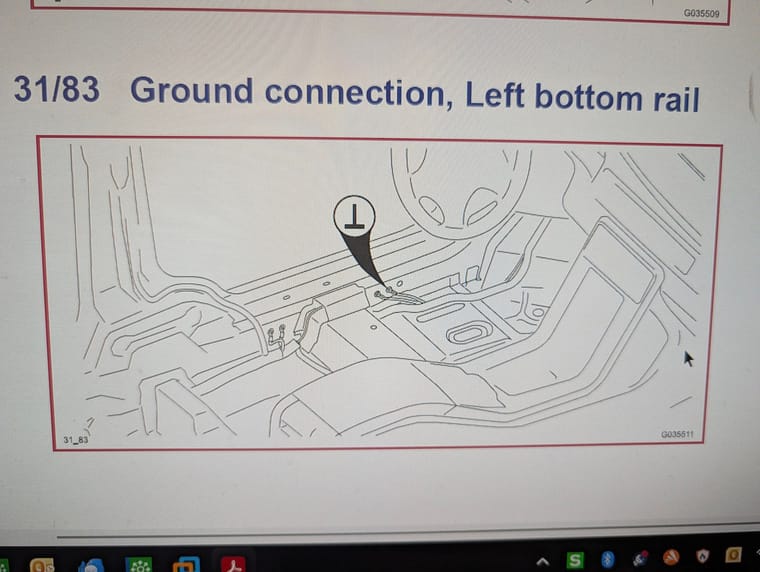
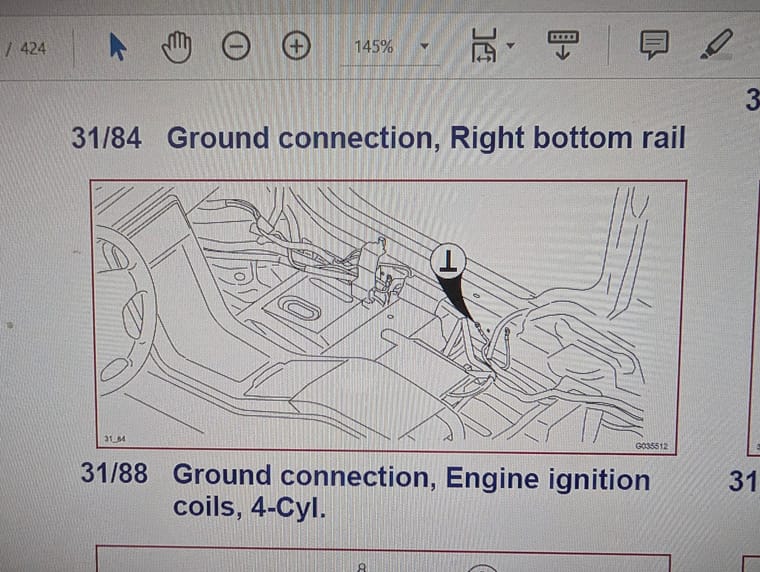
But there usually would be more codes if those are corroded as there are several modules connected to those grounds.
On cars with sun roof it's a known problem that water gets into the fuse boxes behind the glove box when the drainage is clogged. Your error codes for a to high signal from the humidity sensor that is located behind the rear view mirror and a code for a bad antenna signal are also indicators that water might have reached places where it doesn't belong to.
A loose windscreen that lets water in is also pretty common on P3 Volvos.
Are there really just the three codes you posted, or do you have more DTCs? Also temporary ones would be interesting. -
12v battery critical charging faultVisit a volvo dealer and let them check for software updates. Most times it's caused by a combination of old/degraded batterie (new batteries can sometimes also be overmatured or degraded by wrong/to long storage) and a software bug. You can also try to charge your batterie with an AGM compatible charger (positive cable directly at the positive terminal of the batterie and negative cable to the chassis or engine). After it's fully charged, keep the car locked for at least 4 hours.
-
Readness emission codes@gintasd This basicly means the car is not ready for an emission test. DPF and cat to cold, EGR closed. Nothing to worry about. If you drive for 20-30 minutes and than connect vdash, everything should be green.
-
Remote engine startERS through VDD will most probably never be realized, but you can enable ERS via keyfob with vdash.
-
decoding CEM PIN in VDash/ flat config plan.Vxdiag works with vdash and is okay for reading error codes, but it is more than 20 times slower than a DICE, more than 30 times slower than a Mongoose/Super J2534 and highly unreliable when transfering data. Vdash basically supports all J2534-2 compatible adapters, but only DICE(and clones) and Mongoose/Super J2534 are fully tested and recommended.
A Mongoose or Super J2534 won't make a difference regarding PIN decoding. Vdash has no decoding support for P1s before 2011. AI decoding should work, but is currently unavailable.
If your willing and able, you can build a decoding device yourself https://github.com/vtl/volvo-cem-cracker/wiki
Otherwise you will need a VDD https://d5t5.com/article/vdd-p2-cem-pin-decode , Modunlock https://modunlock.com/wp/ or find someone who has access to a legit VIDA subscription and knows how to extract the PIN while transfering a software update to your car. Or you need a specialist who is able to extract the PIN on the bench. -
VIDA 2014D/2015A Windows 11@sizan This is "normal". The same thing happens with the original VIDA2014D. VIDA will still work as long as VidaMonitor was fully started before it crashes. Just restart your computer after using Vdash to be sure that everything works as expected. The DICE and Mongoose drivers sometimes also get blocked after using Vdash until you reboot.
Nothing a reboot can't fix or to worry about.
-
Turn off START/STOP Permanently in VDASH.@Belos Did you receive a message/email that your pin code was successfully cracked and added to the vdash database?
You should always have a powerfull charger connected while you perform configuration changes. And after changing configurations, you should leave the car alone and locked for at least 15 minutes. What adapter do you use to connect your car and computer? -
V50 P1 - Language change + key reprogramming without original key codes@aiveo to code a new ignition key you first have to decode the IMMO pin. This
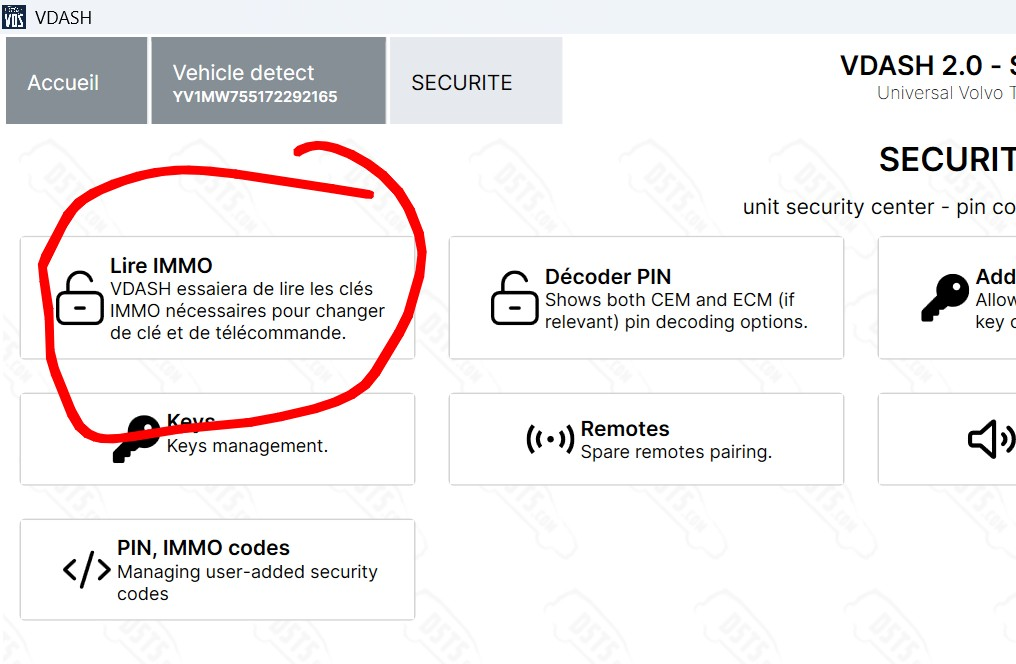 should be the option, if my translator is correct. After that you can add new keys. The key wizard allows to just add the key without having to pair the remote part. Vdash should also show you how many keys and remotes are currently paired with your car.
"Engine service required" means there is one or more active error codes (DTCs) stored in the engine control module (ECM). You should see them after connecting Vdash and wait for all ecus to load. Best practice is to make a screenshot of all codes shown and clear them (ignition pos. II, ignition on, engine not running!). After that turn off the ignition for a moment, than start the car and rev around 1500 RPM for a moment, than read codes again and see what codes came back.
-
2023 Volvo xc60 b5 Safety mode(Crush mode) HELP!@Beka0804 You will need your VGM pin first or you won't be able to send any command to the car.
Try to contact the user @VOLOK he might be able to help you get this pin.Then you need to follow this guide
And maybe you also need to do this if any airbag was deployed.
