
@gamaz if this is still interesting for you. Your donor part should have a white backside (hardware gen. 1) and should come from a donor car with a non-VEA engine and automatic transmission. TFT DIMs with black backside (gen. 2&3)are not fully compatible with your car and might not work as expected.
More info here
 T
T
T5 T6 Schnappi
@T5 T6 Schnappi
Posts
-
Retrofit volvo xc60 -
Błąd ECM 26F0 XC90 2.4 D5 185KM 2007@Olo Check/clean the tmap sensor at the intercooler. Do a smoke test of the whole intake, on all charge pipes and the intercooler. Also check the fuel lines for leaks. You have either a boost leak, a clogged/defect tmap sensor or too low fuel pressure. Depending on your milage it could also be a dripping/ leaking injector.
-
Wrong identification of car@toXicity First off all contact the Vdash support for the wrong VIN decoding. And as additional info, some CEMs are known to be impossible or extremly slow to crack by brute force. And as your car seems to be an ICUP(Android Automotive) car, which is the case for all cars from MJ22 onwards, it's impossible to crack the CEM. You will need to obtain the VGM and CEM pin via an official VIDA subscription and Wireshark, or with OrBit.
https://d5t5.com/article/volvo-cem-pin-code#spa-cma -
Aisin TF-80SC unusual shifting problems@SKanev sounds more like an engine problem. Any DTCs?
-
VDD App - HV battery values on a hybrid.@Suggi this most probably is the remaining distance when driving on battery and not SOH.
-
Volvo S60 (2004) Autodimming Rearview Mirror with Compass Retrofit@David-B-Seres those mirrors/UEMs are not compatible with your car. Look up the correct part number for your car in VIDA. It should be 30658231 or 30658232. Compass is not possible for your car. You also need to clone the software of your original mirror to the donor part and change the car configuration to automatic dimming mirrors with Vdash which requires the CEM pin.
-
CEM clone@Metsavend What excactly is your expectation after changing the CEM? The CEM of the V40 seems to be the same for all model years 2012-2019. Vdash should be able clone these to new or virginized CEMs if you have the write protection and IMMO pins of your old module.
Retrofitting keyless entry should be possible, but it's a hell of a job. Your car is most probably not prewired for this, so you have to install all the missing wiring. Also all the antennas needed and the door handles. then you can either install a used compatible module after extracting the KVM IMMO pin on the bench from it and adding this pin to Vdash. And hope that there are no other VIN specific codings needed to use it in your car. You will just need to change the CEM configuration with Vdash and should than be able to program keyless fobs to your car. But I cannot guarantee that this will work.
Or you have to talk to a Volvo dealer if he orders the configuration changes needed and also the software packages to programm a brand new KVM module and keyfobs to you car. This is most probably not possible with a subscription for private users as you need to be SERMI or NASTF VSP registered for IMMO/Key coding with VIDA. There might be independent Volvo repair shops with the required license and VIDA subscription level, but you will pay the same or even more than at an official dealer.
-
Temperature unit and fuel consumption@Claudio_DU The language has nothing to do with other region settings. What options do you see when you click on the DIM after connecting Vdash?
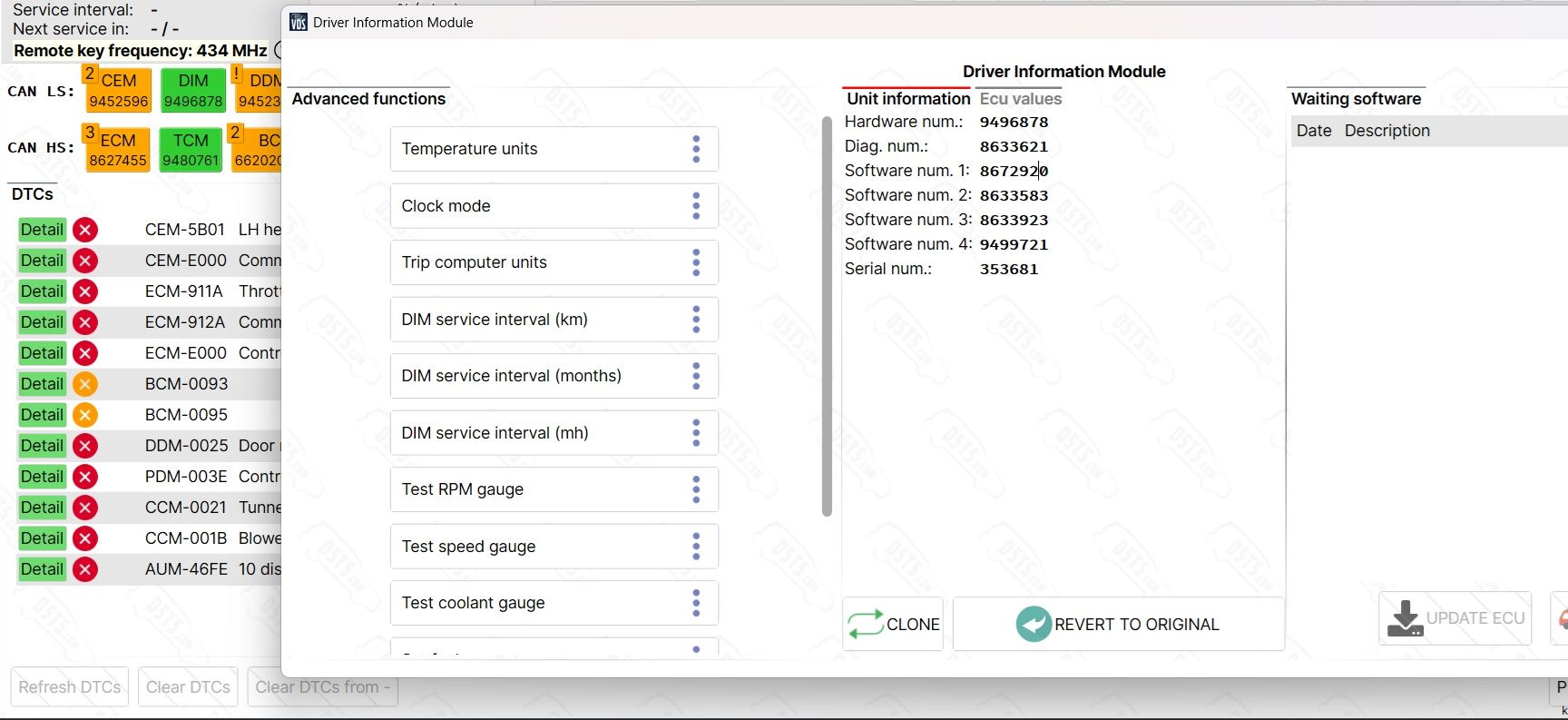
-
V50 P1 - Language change + key reprogramming without original key codes@Mustapha You will need to pay for all configuration changes that can't be done with diagnostics commands. This means if you click on a specific module after connecting Vdash and are able to change something that way, it's for free. If you have to use the "advanced configuration" or "language" menu, you have to pay or buy a subscription. Depending on what options you want to change in total, it might be better to buy a FLAT CONFIG subscription which costs 69 Euros for the first year and includes all configuration changes that are possible. Otherwise single configuration changes usually cost between 19 and 99 Euros depending on what you want to change.
Prices -
V50 P1 - Language change + key reprogramming without original key codes@Mustapha I currently don't have the time and patience to investgate this further, but if your car has a VIN where the last 6 digits are higher than 614383 it should be possible to enable automatic headlights. But you will need to do changes to the electronics besides changing the light switch. Turning the fog lights into DLRs is not possible. Adding a switch with pn 31318937 and a separate switch for the front fog lights might work, but it's possible that you get a DTC because the DLRs are missing. Get yourself a copy of VIDA and EWD(wiring diagrams) to do your own researches. VIDA can be found here in this forum. EWD is available here
The pin decoding sets the car in programming mode. This means the car is completely unusable. Everything goes dark and the doors can't be locked. You will also need to attach a powerfull charger while decoding. Decoding with Vdash can take up to 24 hours, but usually it shouldn't last longer than 8 hours. At least with a Super J2534 adapter. Other adapters will be slower. Of course you can pause the decoding at any time. You can also rent or buy a VDD from D5T5. Decoding via VDD shouldn't take longer than 30 minutes on most V50s.
-
TPMS configuration issue – XC60 MY2017@Bartas222 the factory configuration for iTPMS looks like this.
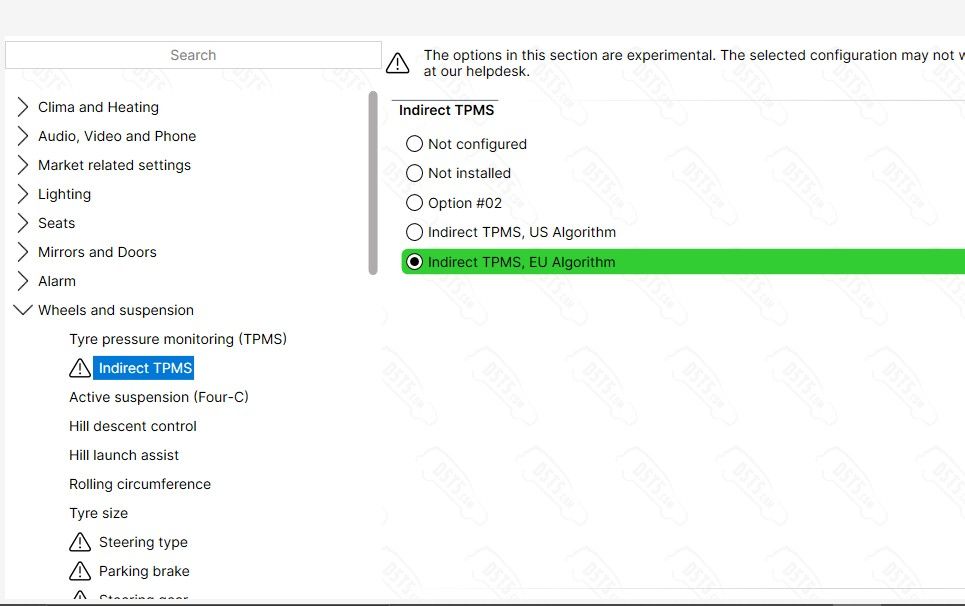
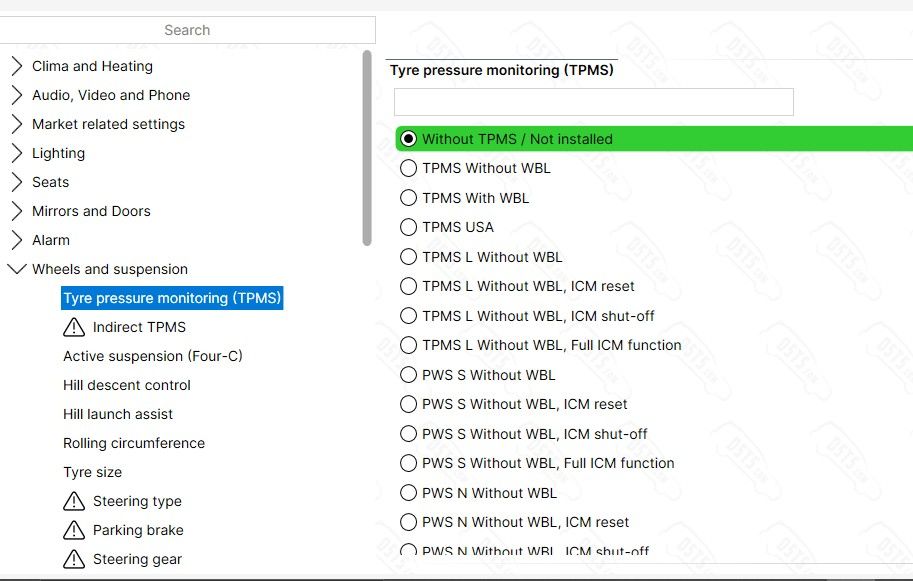
After changing any parameters with Vdash you have to shut down the car and lock it for at least 20 minutes to make sure the changes get properly applied.
The tyre monitor should be visible as seperate menu under "My Car". -
V50 P1 - Language change + key reprogramming without original key codes@Mustapha What options do you have under "front fog lights function"?
-
I need a install a used CCM help!!!!@Jovatech Vdash won't be useful for this, as it lacks the needed diagnostic commands for your car. You will need VIDA for this.
You basically disconnect the battery, change the CCM, reconnect the battery, and then connect VIDA and navigate to diagnostics/vehicle communication/CCM/advanced and use the 2. option. Not sure what it's called in english. Something like self adjustment of flap motor/actuator stop.
That's it.
If your old CCM is still communicating, you can clone it Vdash, but as you want to install a used one, the software for it to operate should already be present in the replacement. -
xc-90II problem with front lamps@sawcar you will need to source the correct control module variants for the EU headlights. Volvo uses variant specific control modules for EU, US, UK and so on. US modules won't work on EU headlights.
-
ECM-6720 after egr+dpf off@0xballer too bad.
Create the new ticket in the working hours of D5T5 for a higher chance of getting an answer. Mon-Fri 9:00 - 16:00 - Central Europe time zone
You can also try sending a WhatsApp message to +420 774 570 383 -
SPA CEM PIN Decode: 29 keys/s (160 hours) despite stable connection and low ping@HoodedLime I didn't mean for cracking, but for coding/programming your car. The DICE should still work, but is too slow and therefore risky to use.
-
SPA CEM PIN Decode: 29 keys/s (160 hours) despite stable connection and low ping@HoodedLime Good luck!

200keys/s is actually okay for a DICE. But on a SPA you should definitely use a Super J2534 or a VOE adapter and not a DICE. -
SPA CEM PIN Decode: 29 keys/s (160 hours) despite stable connection and low ping@HoodedLime Not a helpful answer, I know, but 200 keys/s on a P3 are a clear indicator that your setup is slow or has some sort of bottleneck. 450-500 keys/s on a P3 are possible on good setups. Atleast with P3tool and P3Dx. Not sure about Vdash as I'm not using that for P3 cracking anymore.
-
ECM-6720 after egr+dpf off@0xballer You might want to get in touch with Obbe tuning https://www.obbetuning.nl/
This is the guy who makes all tunes for D5T5. Maybe he can help you. But I'm not sure if the tune is your problem.
Just out of curiosity. Have you already checked/cleaned your throttle body, MAF and MAP sensors? If those are blocked/dirty with lots of soot it's possible that you will get misleading DTCs like too high or too low flow. Also MAF related error codes can be triggered if these sensors are too dirty. It's also possible that one or more injector is worn out.
On some engines the EGR still has to be clean and working, even if it's "deactivated" in the map. I'm not sure about your engine with this.
What adapter are you using to flash the tunes? Anything else than a good DICE clone with M32C chipset or a Super J2534/Mongoose JLR Pro with Atmel chipset is clearly not recommended and might also be a source for your problem. Same goes for the charger/battery tender which has to be connected to the car while flashing any software. But I think that's not really the cause of your problem.
And be aware that your ECM can only be programmed/flashed around 10-20 times before the flash memory might start to go bad and will irreversibly brick your ECM. V50 ECMs are really not designed for regular software updates. -
DIM Conversion UK to EU@Qube Moin
Um deinen Wagen einzudeutschen musst du den CEM pin dekodieren und einige Regional Parameter im CEM ändern. Das ganze solltest du vorm Umbau machen. Und du musst ein LCD DIM mit weißer Rückseite (Gen. 1) und passend zu deinem Getriebe verbauen, die DIMs mit schwarzer Rückseite sind nicht kompatibel mit deinem Wagen. Zwei zusätzliche CAN Leitungen von der OBD Buchse zum DIM musst du auch noch ziehen. Bei deinem Baujahr musst du auch mit einigen Einschränkungen leben. Das Lenkradschloss muss evtl. per Vdash deaktiviert werden, falls du eine entsprechende Fehlermeldung kriegst. DSTC kann nicht deaktiviert werden. Service zurückstellen und Uhr stellen geht nur per Vdash. Power/Eco Anzeige funktioniert mangels Daten vom Motorsteuergerät nicht.
Alles wichtige gibt's hier
Den TÜV interessiert der Umbau nicht solange die Kilometer nicht manipuliert werden, was mit Vdash eh nicht möglich ist. Der Original Kilometerstand wird beim Umbau vom Originaltacho bzw. CEM übernommen.
