
@bastienlaf You also need to put the car in D and then in N to read codes. And you have to sit on the drivers seat all the time. Putting the car in P or leaving the seat will end the communication with the car.
 T
T
T5 T6 Schnappi
@T5 T6 Schnappi
Posts
-
Can't read TDC polestar 2 2023 -
Can't read TDC polestar 2 2023@bastienlaf do you have any 3rd party antivirus, security, firewall software installed?
-
Can't read TDC polestar 2 2023@bastienlaf I can't tell you why Vdash doesn't read any codes, but to delete them, you will need the VGM pin for your car. This pin can only be obtained by installing a software update/reload via the official VIDA and monitoring the traffic between the car and VIDA while this happens. Do you see all modules after clicking connect in Vdash? If yes, in which colours?
-
SPA add keysVdash can't add keys/fobs on any SPA. You will need an official VIDA subscription for this.
According to this parts catalogue https://volvoparts.barrybourke.com.au/a/Volvo_2023_XC60-20l-4-cylinder-Turbo/_51513_12299541/Remote-control-key-system/GR-448363.html the fobs sold by D5T5 should work for your car if you take a look at the part numbers. But to be sure open your existing fob and compare the FCC ID and IC number on the circuit board. -
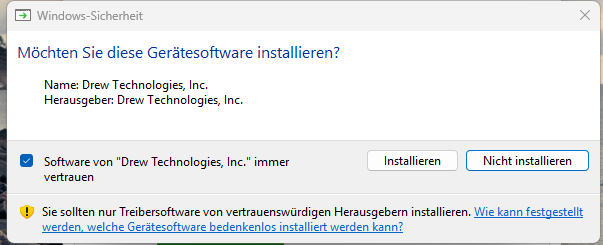
SUPER J2534 cannot runing, windows 11 latest update@Naim uninstall the Mongoose drivers. Download and install the ones from here https://d5t5.com/sw/J2534_Driver_x64.msi
and don't forget to tick the box in this dialogue
-
SUPER J2534 cannot runing, windows 11 latest updateHave you already tried to simply reboot Windows? Sometimes the driver gets blocked after I used Vdash on some of my computers. A reboot solves this for me.
-
VIDA 2014D/2015A Windows 11@Di5B Do you run VIDA on native hardware or in a VM? Dedicated VIDA machine, or is it your everyday computer with lots of other software installed and lots off unnecessary background processes? Is any 3rd party antivirus or security software installed? What hardware specs?
-
3G to LTE (4G) VCM Upgrade on XC90 (2016) via VDASH – Connector Differences and US to EU Conversion@Ceco Vdash can't sync/program used VCMs to your VIN. You need to find another way. Orbit and VIDA also can't be used for this. Sorry.
-
Volvo V50 Cruise Control activation HELP! (Software activation near Berlin)@klangwergkh Moin
Wo genau in Berlin bist du denn zu Hause?
Hier kannst du mal suchen ob jemand in deiner Nähe hilfsbereit ist.
Grüße aus Lichtenrade -
V70III ICM bricked during language change/flash@mrgrog You should create a support ticket instead of using Email. Red symbol in VIDA means no communication or missing software. I'm not sure which module gets flashed to change the language, but the IAM is known to get bricked by updating its software, even at the dealer. It might be possible that D5T5 can prepare a software package to install it again, but this might require the original Volvo USB Stick which is usually used for such updates. But this pure guessing as I haven't encountered such a problem yet.
-
V70III ICM bricked during language change/flash@mrgrog you should contact the support. They might see something in the logs on the Vdash servers that didn't work as expected. To install another IAM/ICM you will need to crack the CEM pin and ITP security PIN and than disable ITP security.
Did you left the car alone and locked for at least 20 minutes after you did the conversion? Where there really no error messages shown in Vdash?
You can try to restore the factory configuration. But you should talk to the support first.
Do you have any DTCs in the CEM, or just a greyed out IAM/ICM? -
VDASH warning to disconnect LPG unit?@bochenn Does your car have LPG/CNG? If not, ignore this warning, it's a generic warning as some cars similar to yours are equipped with aftermarket LPG/CNG units, that can and will interfere with the operation of Vdash. Click on "This VIN has NOT LPG unit mounted, do not show this warning anymore." and forget that you saw this message.
If you have LPG/CNG pull the associated fuse and select "The car has LPG unit mounted and is turned OFF (do not show this warning later today)."
If you are sure that you will never connect any car with LPG/CNG to your account select the last option. -
Enable Active High Beam@bochenn after looking over your configuration I'm almost 100% sure that your car doesn't have a FSM and therefor no AHB. You don't have collision warning, traffic sign indication, lane keeping or adaptive cruise control which is a clear sign of "no FSM".
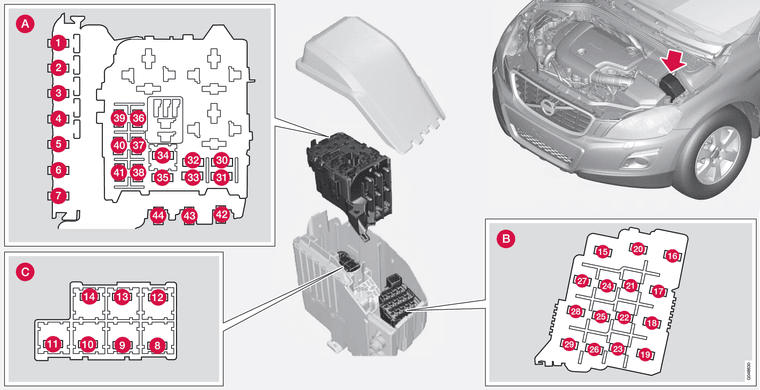
Do you see your headlights leveling themself when you turn them on? Maybe park in front of a wall and take a closer look. You should see the light going up and down right after you turn them on. If not, the leveling is not working which means new (used) headlights. The same goes for the bending light function. Turn the steering wheel and see if the light follows. You can also activate these functions in VIDA (Diagnostic/Vehicle communication/CEM/Activations) to test it. Also check fuse nr. 16
-
ALERT: downloaded VXDIAG and it had a Trojan inside@bochenn A Mongoose / Super J2534 is the best option for most P80, P1, P2, P3 plattform cars and will also work on SPA cars. A so called full chip DICE clone would be slightly slower but also okay.
Does your current adapter look like the one on your photos? If yes, which name does it report in the Windows device manager in the vehicle pass thru device section when it's connected?
If you intend to buy any adapter from Aliexpress or equal chinese shops you must be prepared to receive low quality parts that look like the original but don't work as expected. A good Mongoose clone with the original Atmel chipset or a good 1:1 DICE clone will never cost 2 digit amounts of money. At least not in Euros. -
VIDA 2014D/2015A Windows 11@Eros Install guides in english and german for clean installs can be found here
If you have any useful additions just let me know them.If you want to replace an existing VIDA2014D installation, you need to fully remove that first. You have to stop and close VidaMonitor; stop all running SQL services; uninstall VIDA, Isoview, everything with SQL in it's name; reboot your computer; manually remove all folders containing the terms VIDA, Volvo, Ford, Isoview, SQL, Arbortext, also those that are hidden in various locations; check the Registry for leftovers and also delete them; reboot the computer again; then start ZaanTerrors Installer. Maybe I will write guide for this when I find the time and motivation to do it and add it to the install guides.
As a golden rule you shouldn't use your everyday computer for VIDA. It's better to use a dedicated machine for VIDA or create a Windows 2 Go USB drive and run VIDA from that, when your computer is already cluttered with all kinds of installed software.
The more stuff you have installed besides VIDA, the more things can and will interfere with it. Especially 3rd party antivirus/security softwares and the damages done to Windows by so called optimization/tuning softwares could give you a hard time trying to get VIDA up and running. -
Enable Active High Beam@bochenn The link has been changed to https://d5t5.com/sw/J2534_Driver_x64.msi
Check the connector at the headlight for corrosion. Also check for humidity inside the headlight. Remove the headlight and gently unplug and plug in the connector 2-3 times. It's also possible that your headlight is broken and needs replacement. Sadly this is quite common. -
ALERT: downloaded VXDIAG and it had a Trojan inside@bochenn It's absolute not recommended. Pin cracking is super slow and might even fail. And programming anything can go completely wrong because of the poor design and really, really slow communication speed of these adapters. So, no. Don't use it with Vdash for coding.
-
VDASH login issues@bochenn what exactly is your problem? The Vdash login is a two-step-process. First you enter your email adress, on the next screen, that you posted, you enter your password. If the field to enter the password is missing, make sure that all updates for Windows and. Net 4.8 are installed. Have you already tried to simply reboot Windows? If you have any 3rd party antivirus/security software installed, set it to permanently disabled, reboot the computer and try again.
Don't use Vdash in a VM or on Windows 7. -
ALERT: downloaded VXDIAG and it had a Trojan inside@bochenn that's a false alarm and nothing to worry about. This is known to happen since ages. D5T5 can do nothing about this. And the guys from Vxdiag don't care at all about this. Restore the file from the quarantine and allow it to be executed. If you feel unsafe about this, return your adapter and get a better one. Vxdiag/Vxnano are absolute crap anyway.
You will have to run the Vxmanager every 4 weeks to renew the license, or the adapter won't work.
And don't use this adapter for anything else than diagnostics,if you don't want to brick your car. -
Headlamp failure@Nirp Do you install everything according to VIDA/EWD? Additional wirings, HCM, level sensors, light switch, and so on. Or did you just swapped in the headlights. What option in Vdash did you select and what DTCs do you have?
