@sizan This is "normal". The same thing happens with the original VIDA2014D. VIDA will still work as long as VidaMonitor was fully started before it crashes. Just restart your computer after using Vdash to be sure that everything works as expected. The DICE and Mongoose drivers sometimes also get blocked after using Vdash until you reboot.
Nothing a reboot can't fix or to worry about. 
 T
T
T5 T6 Schnappi
@T5 T6 Schnappi
Posts
-
VIDA 2014D/2015A Windows 11 -
SUPER J2534 cannot runing, windows 11 latest update@EricJ D5T5 can do nothing about this. The driver is made by Drew Technologies Inc.
The Super J2534 as well as all other cheap Mongoose clones are unlicensed copies of the original Drew tech adapter. You will need to wait if they make a new driver and if it will work with clones. I would doubt that as this adapter is discontinued/out of support.
Here is the link for the latest official Drew tech Mongoose driver. https://opusivs-marketing-downloads.s3.us-east-1.amazonaws.com/downloads/PastProducts/MongoosePro/JLR/J2534_MongoosePro_JLR_x64.zip dated 20.12.2023
Don't use the drivers that came with the adapter if you got it from Ali or similar Shops.Feel free to test if it works with your adapter.
You can also open the Windows start menu, type certmgr.msc and hit Enter to open the Certificate Manager and check if Drew Technologies is listet under Trusted Publishers.
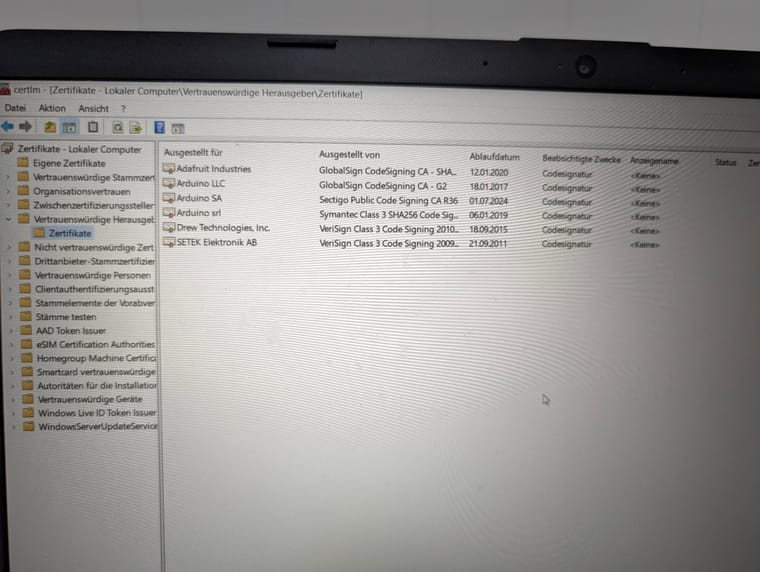
If this is not the case, you need to remove the drivers, maybe also the certificate under Untrusted Certificates, and reinstall them, and tick the box in the dialogue as I have posted it above.I'm using Win 11 25H2 fully patched, and the driver works.
-
with my POE interface Vdash dont comunication with ECU XC60II 2018@tone The VOE adapter doesn't need any driver. Your computer must be capable to maintain 2 network connections simultanously which isn't possible on lots of non-business devices. The Mongoose/Super J2534 drivers can be found here https://d5t5.com/sw/J2534_Driver_x64.msi
The Super J2534 will also work for your car.
To reset the on call message you will need to visit a volvo dealer or someone with an official VIDA subscription. You need a software download to reset the VCM with part number 32398268. This isn't possible with Vdash. -
ACC Retrofit@yellowcake part number 31423315 and 31433516 seem both to have been replaced by 31433517. Also both of these guides don't mention the modelyear and engine code. I would suspect MY -14 or earlier.
You might want to find someone with access to an official VIDA subscription to look up the correct part numbers and also the wiring diagrams. VIDA2014D and EWD2014D are both useless for your car in these terms. -
ACC Retrofit@yellowcake Why do you want to replace the BCM? If you take a look here you will see that there are 2 different BCMs for different chassis numbers. ACC or not doesn't matter. You just need a brake booster with part number 31381633.
Vdash should be able to clone the BCM of you want to replace it anyway. -
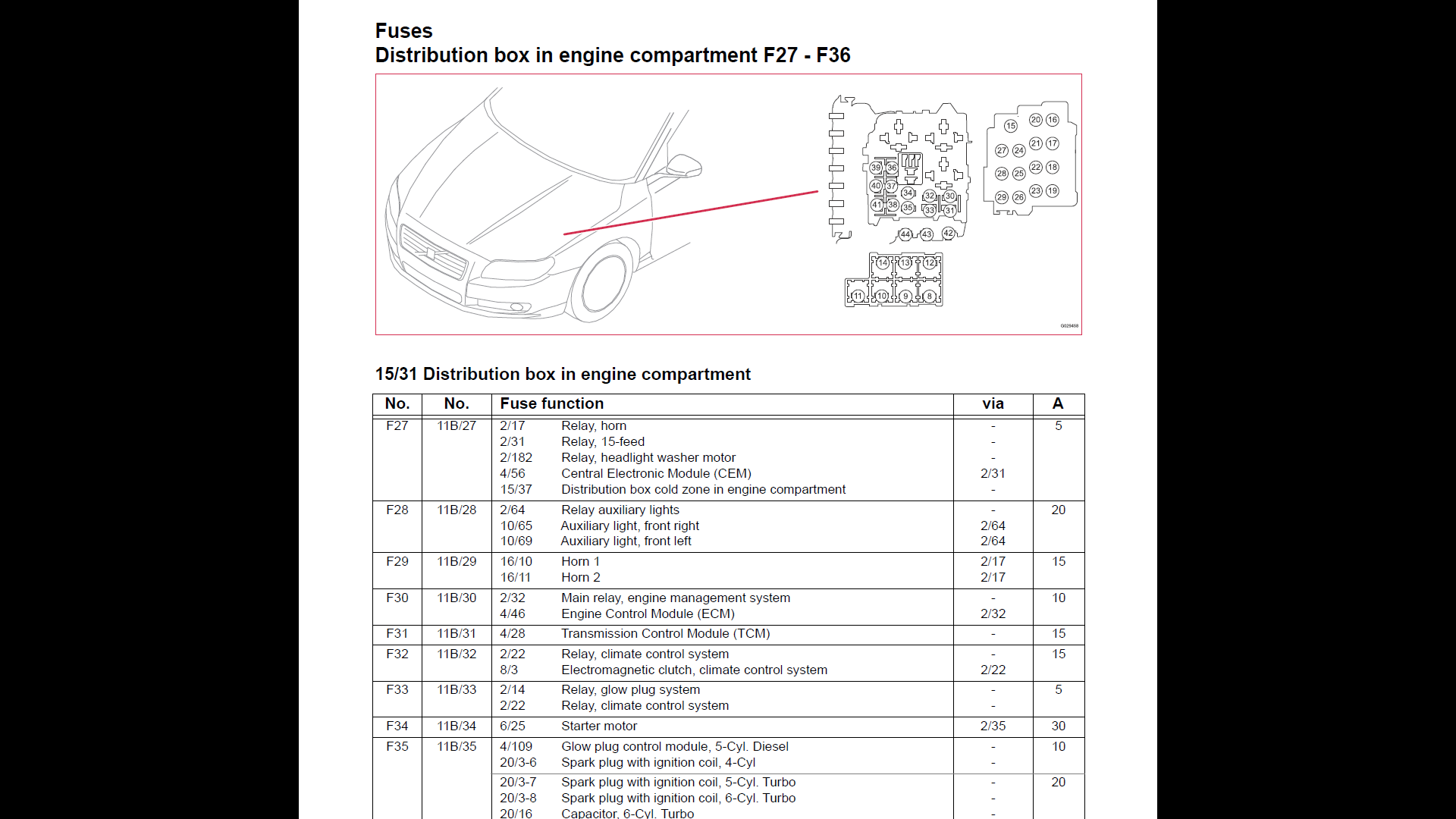
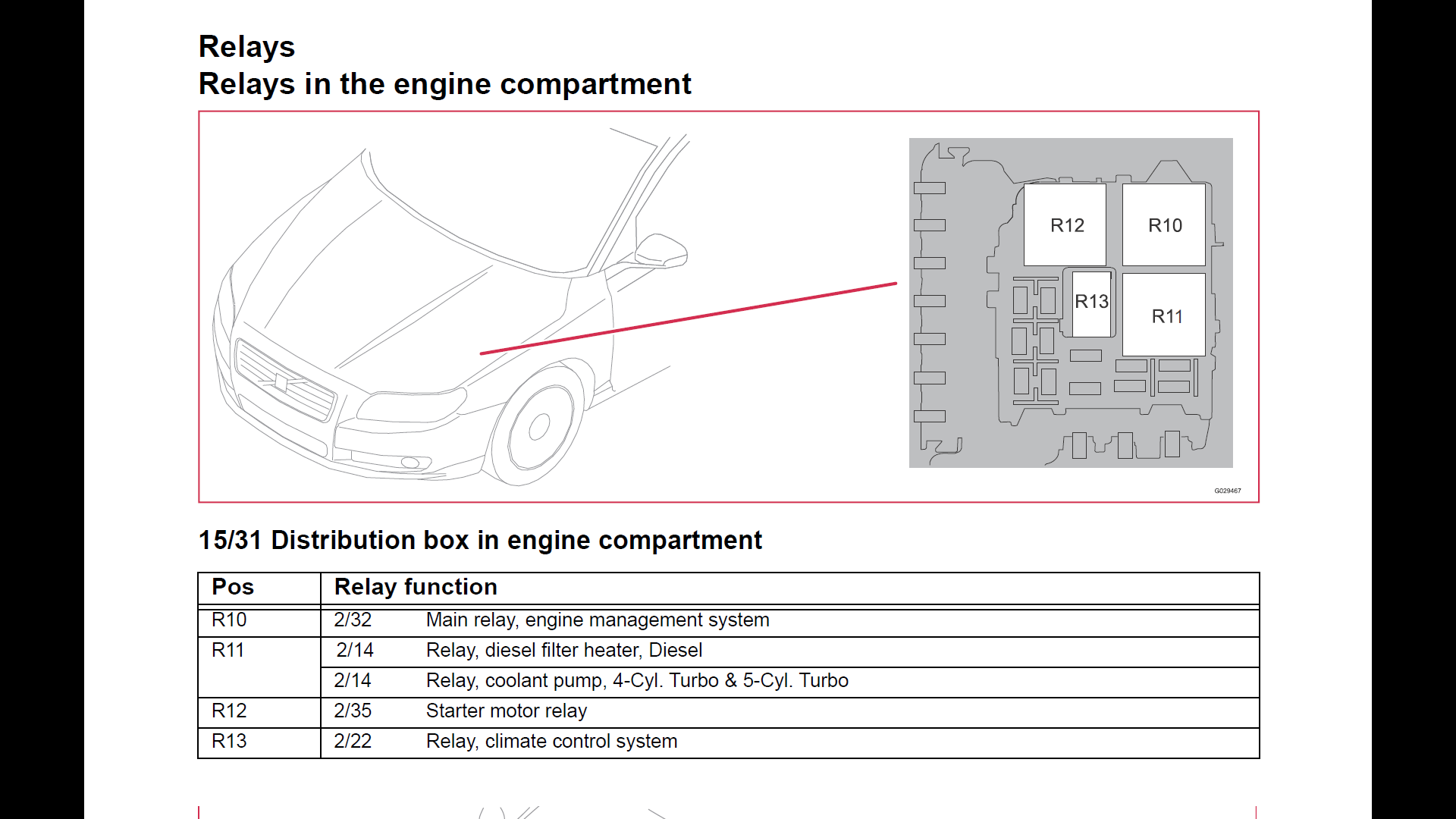
Volvo S60 AC Clutch Relay and fuse location@SU-AM Removing the pressure sensor will drain the AC. You will need to evacuate/empty to whole AC via a vacuum pump and then refill it with R134a without letting any air going in the system. I can't tell you the exact amount of refrigerant. Stay away from those DIY refill sets. You will make more damage than you can even think of by using this crap. Fill in to much and you damage several parts of the AC. Fill in too less and the AC won't work and you will also create damages.
Visit a garage that has the special tools and experience that are required for this and let them do it the proper way. -
VIDA 2014D/2015A Windows 11@Bobeee This version of VIDA is heavily modernized "under the hood" to work on 64bit Windows 10/11 only. And running VIDA in a VM is not recommended at all, even if it works. You can create a Windows To Go USB drive or stick with this tool and run VIDA from that, if you want to run a VIDA only environment.
Everything works exactly the same as all other versions of VIDA2014D. Just the VIN decoder is extended to recognize some P1s and P3s up to modelyear 2019.
The hardware requirements are slightly higher than for the original VIDA2014D as the SQL server is updated from SQL 2008 to SQL 2025. As well as a lot of other things that are replaced with more modern versions.
Of course software updates/reloads don't work like all other offline VIDAs.
The Installer made by ZaanTerror makes it really easy to install if you do a clean install btw.
Replacing an existing VIDA requires a little effort before you can install the new version. -
VIDA 2014D/2015A Windows 11@jexyq Oh, and you have to reboot your computer after you have used Vdash before you can use VIDA, and vice versa. Don't ask me why. It's like this on many but not all of my computers.
-
VIDA 2014D/2015A Windows 11@jexyq I would suspect your installation to be somehow borked then. You can use most functions of VIDA without being connected to a car. If diagnostics still don't work that way, it's time for a re-install.
Stop VidaMonitor
Exit VidaMonitor
Uninstall VIDA
Unistall SQL Server
Unistall everything else with SQL in it's name
Unistall Isoview
Reboot the computer
Delete all folders containing VIDA, Volvo, Ford, Isoview in their name
Delete : C:\Program Files\Microsoft SQL Server
Reboot again
Install VIDA from scratchYour Hardware is not the best, but good enough to run VIDA.
-
VIDA 2014D/2015A Windows 11@jexyq does the car communicate with Vdash through your adapter?
Are you able to enter the diagnostic tab "offline" with no car connected? If you just enter your VIN or just define your car without the VIN, and than click ok?
Are you using the correct login? You need to login to the correct partner group which equals the market your car was initially meant for. Never use "Admin".
Have you tried to disable VIN decoding by going to computer settings in VIDA and then manually entering the VIN (VIN Dekoder off in red letters must be shown next to the VIN boxes), specify your car, then enter ok (don't click read next to the communication tool!), and than go to the diagnostic tab? This works even on most P1 and P3 cars that are officially not supported by VIDA2014D. As long as your adapter works.
What are your hardware specs CPU, RAM, SSD? VIDA requires a fast SSD and 4 or more GB of RAM to be halfway responsible. Maybe you need to be more patient for the diag database to load. This sometimes takes a several seconds even on my fastest computer with 16GB RAM and really, really fast NVMe SSD.
Are you sure that your adapter is okay? Most Mongoose clones from aliexpress, for example, don't have the original Atmel chipset or even a mongoose at all inside their chassis and are basically dead on arrival or don't work as expected. Mostly those garbage adapters don't properly communicate with either the HS or LS CAN leading to exactly the problem you have. VIN gets recognized. But full Diagnostics/Communication with the car is impossible.
-
DIM language change -
DIM language change@InfinityBG The DIM language can be changed via the Sensus in the MY CAR menu under the system settings. No need for any subscription.
If you want to change anything with Vdash, you first need to crack the CEM pin. Don't buy anything, if you didn't have done that. -
VIDA 2014D/2015A Windows 11@KonK Do you try to replace an existing VIDA or is it a clean install? Do you want to install it in a virtual machine or on native hardware? What version of Windows?
Please locate the following folder: C:\Program Files\Microsoft SQL Server\170\Setup Bootstrap\Log , there should be one or more subfolders with date and time as name, open the newest one and locate the file named "Detail.txt". It should have details what is the problem somewhere at the end. -
Volvo S60 AC Clutch Relay and fuse location@SU-AM the complete wiring diagrams with everything regarding electrics for your car can be found here https://vidaresources.volvocars.biz/ewd/Eng/index.html
-
Volvo S60 AC Clutch Relay and fuse location -
Does DIM cloning require CEM pin?@heiszerton the DIM itself is not pin protected. If you just want to clone the software, there isn't any pin required. The CEM pin is only needed if you want to change region specific things like trip counter units, km to miles, and so on. Those settings are stored in the CEM config.
-
Can't read TDC polestar 2 2023@bastienlaf If you manage to get access to VIDA and find out how to add options with it, then yes. That's the best and safest way to do it, as all changes get registered at the PIE servers in sweden and become part of the car configuration known to Volvo. But VIDA is only available to private users in the US and Canada. In the rest of the world you need to own a VAT registered garage to get VIDA. And some functions are also a "dealer only" thing. Adding options and keys might be some of those things, as VIDA has different levels of access rights and functions that you can subscribe for. And some functions are simply not available on non-dealer accounts.
And VIDA would also be the most expensive way to go. The subscription costs money. And every software download also costs money. And syncing used parts is also not possible for a lot of modules. If a module needs software to work, chances are high that you can't sync it to your car with VIDA without getting it somehow virginized by a specialist beforehand. -
Can't read TDC polestar 2 2023@bastienlaf Orbit offers the pin retrieval as a paid service and actually shows you all pins you paid for. Vdash can't crack/obtain any of the pins you need. But even it would be possible through Vdash, you wouldn't get to see the pins. The rest of the functionalities are basically the same for both softwares.
And if you want to visit a volvo dealer, you need to revert all changes done with Vdash or Orbit, or your car will be blacklisted for all software updates. https://d5t5.com/article/vida_software _download_failed_car_blocked -
Can't read TDC polestar 2 2023@bastienlaf P* are a little bit out of my experience, so I can't tell what might be the problem here. But I think it's either your computer that has problems with using 2 network connections simultaneously. One to your car and one to Internet. Or the Vdash servers need a little kick in the butt.
You can also try this software https://vtool.info/ but you will still need the VGM pin to delete codes. -
Can't read TDC polestar 2 2023@bastienlaf did you click on connect in the top left corner?