T
T
T5 T6 Schnappi
Posts
-
2015 Volvo V60 D3 – Airbag and ESC Warning Lights On -
Checksum error - EGR delete@Bigv Do you have a check engine light now? This would mean there is another problem with your engine. Checksum errors don't trigger the CEL and can be ignored as long as the engine starts and runs without problems.
I can't help you with VIDA. Subscriptions for legit VIDA are only available for private users in the US, while I live in germany. Cracked offline versions like VIDA2014D are not able to do software reloads. Your tuner should have made a backup of your original software and should be able to restore it.
Reverting to stock software would also require to remove the blanking plate as the EGR would be reactivated. -
Checksum error - EGR delete@Bigv Did you just blank the EGR, or did you install a remap/tune with EGR off? Remaps/tunes will always trigger checksum DTCs in the CEM and ECM, which you can only get rid off by reverting back to the original, untampered Volvo Software of the ECM. Or by performing a software reload for the ECM with VIDA. There is no other way to fix this.
-
Troubleshooting tips for vDash DOE connectionThanks for sharing this.
My personal recommendation is to use a dedicated computer with as less as possible 3rd party software installed. Especially no 3rd party antivirus, security, firewall and VPN software. As those clearly interfere with the vehicle communication. The lesser useless running background processes, the better.
Using your cluttered everyday machine for stuff like Vdash or VIDA is always a bad idea.
And Vdash most probably has some sort of anti tampering routines. It most likely detects software like Wireshark or the Npcap drivers and crashes on purpose, to prevent reverse engineering of how Vdash works. -
XC90 SPA 2016 UK Headlight swap to EU Help@SOpEL Volvo lists specific modules for specific headlight variants. So it's not only a matter of software. If you can open this link you will find several variants of headlights, and several different modules which are only compatible with specific headlight variants. You will need to source modules that are compatible with your headlights.
-
ECM-6720 after egr+dpf off -
Volvo XC40 T3 2020 manuál – dodatečná aktivace adaptivního tempomatu ACC@girhoobin this is indeed new to me.
Based on that price your car lacks the hardware requirements for ACC anyway. Do you have a detailed offer or did they just tell you the price of ~2200,-€. The "application" to activate ACC with VIDA should cost around 50-150 Euro, so the rest of the price is for changing/adding hardware. ACC requires a separate vacuum pump (31252952) , seperate sensors (32134966, 32134967) additional wiring, maybe also an additional control module and so on. Just enabling parameters will not work. -
Dim-u300045 Volvo xc60 2013@Atlantic28 create a support ticket here and ask if they can prepare a software reload for your DIM. Maybe there is no automatic fix for your software version yet.
-
Volvo XC40 T3 2020 manuál – dodatečná aktivace adaptivního tempomatu ACC@girhoobin Volvo doesn't offer ACC for manual cars for security reasons as there is a very realistic risk to stall your engine when ACC is decreasing the speed too much. You might be able to enable the parameter with Vdash anyway.
But it's definitely a serious traffic security risk to enable it in a manual car, as a suddenly stalled engine while driving means almost no brakes and a highly distracted and panicing driver who tries to restart his engine or doesn't even know what to do while the car is still rolling, and therefore it's absolutely not recommended as you are threating your own life as well as the lifes of everyone around you. -
ABL retrofit – Which HCM part number is required?@Gicklich 30782604 should be the correct part number for your car. 30782605 is only for XC90s from chassis number 650101. Your screenshot also shows the VIDA page of a XC90. The V70 catalogue in VIDA only lists 30782604.
-
VCM no Ethernet signal@Libelix That will hurt your bank account. New VCMs are really expensive.
You will need to revert all changes done with Vdash and OrBit. The CEM configuration has to be the one that is known to the VIDA/Volvo servers in sweden or the car will be blacklisted.
If the independent has paid for a VIDA license which includes software reloads he should be able to do this. But the price for the software reload will be the same or even higher than by the official dealer as the license fees are very expensive, and almost every software package has to be bought like a "spare part". Ask for an offer first. -
Flap Actuator testing@reeferjon What did you use to get this code? That's no Volvo/VIDA format. And that P200500 code is not present in VIDA for the ECM of your car. Scan the car with Vdash or VIDA.
Vdash is no diagnostic software. You can still try live data reading via the ecu diagnostic function of Vdash, but you will need to use a Super J2534 adapter or a really, really good DICE clone for this. Other adapters are to slow for this.
There should be at least 3 different ECM values that you can monitor. Demanded throttle position, and two values for the 2 sensors. Demand and sensors should show similar values.You can also use VIDA, which you can get in the depths of this forum, and perform a throttle activation via the ECM to test it's function while the engine isn't running. I'm not sure if Vdash also has that function, as it is not made with diagnostics in mind and therefore lacks lots of such functions.
As your code seems to be airflow related, have you already checked your MAP sensors? Like this? Your car has two of these sensors. One in the plastic pipe between the throttle body and the intercooler. And one as shown in the article I've linked. Both tend to get clogged and create lots of codes like MAF errors or low airflow codes.
If there is lots of carbon buildup on the sensors, cleaning the throttle body and MAF is also a good idea. -
VCM no Ethernet signal@Libelix there are some specialists for ecu repairs that seem to offer cloning the software to used VCMs "on the bench". This would be the cheapest way to go, if you find someone who does that for you.
Via the OBD port the only way to program a VCM seems to be a brand new module and programming with a legit subscription of VIDA. But as your car is equipped with a "wrong" ECM, this will most probably be impossible unless you re-install the original ECM and of course restore the original factory software configuration of your car as VIDA detects tampered hard- and software configurations on SPAs and blocks the VIN for all software downloads until the original configuration is restored and Volvo accepts to re-enable software downloads for that VIN. -
VCM no Ethernet signal@Libelix Is your car still a sensus or already an iCUP? On Sensus cars the obd port is indeed connected to VCM. On iCUPs its connected to the VGM. As your car is shown as MY2022 I suspect it to be an iCUP.
Wiring diagram for the diagonstic port of Sensus cars can be found here
Wiring diagram for MY23 iCUP here
Pins for the Ethernet are 3,8,11,12,13
If your VCM is really damaged you will have a big problem. VCMs can't be cloned. At least it's not possible to used ones due to pin mismatch. -
VIDA 2014D/2015A Windows 11@V40 after login into VIDA first go to computer settings in VIDA and disable the VIN decoding
Than go to define vehicle profile and check that something like VIN decoder off is written in red letters next to the VIN box
Don't click on "read"!
Enter your VIN
Manually define your car by chosing the latest model year, an engine most similar to yours, transmission and steering
Click on OK
Check if the repair menu is availableIf this doesn't work you will need to uninstall VIDA and re-install it in another language. Some localizations are incomplete and lack some data for specific cars. English seems to be the most complete version.
-
VCM no Ethernet signal@Libelix So your car was tuned by RICA. What does their support say about your problem?
Is there no DoIP communication with any software? OrBit, Vdash, Vtool? Or is it just Vdash?
You seem to mix abbrevations. VCM is the Volvo on Call module and has nothing to do with acccesing the car via OBD. VGM is the stupid firewall behind the OBD port, that limits the access to car if you don't have the VGM pin. But even without the VGM pin you should be able to read codes and access some service functions with Vdash via DoIP/VOE adapter. -
XC90 SPA 2016 UK Headlight swap to EU Help@SOpEL the modules needed for your EU headlights have the part numbers 31395943 (pos. 2), 31395944 (pos. 3), 31395945 (pos. 4), and maybe also 31395946 (pos. 5).
Without any guarantee that this is still correct.
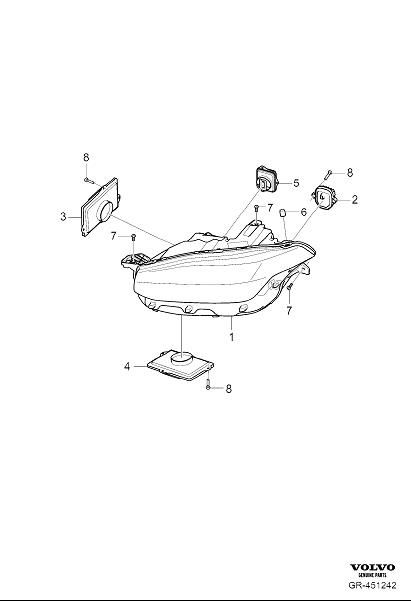
Vdash can't perform software reloads/updates or configure headlights on SPAs. That's my last state of knowledge.
You might be able to clone the HCM software from your old modules with Vdash, but I can't tell you if this will solve your problems.
The software seems to be the same on all HCMs. At least the software number for a HCM reload is always 31472823 in my catalogue. -
2023 Volvo xc60 b5 Safety mode(Crush mode) HELP!@Beka0804 You will need your VGM pin first or you won't be able to send any command to the car.
Try to contact the user @VOLOK he might be able to help you get this pin.Then you need to follow this guide
And maybe you also need to do this if any airbag was deployed.
-
Volvo On Call Service Problem@Phantom244 Moin
Da du auch aus Deutschland kommst, wechsel ich mal die Sprache.
Die Antennenverstärker hängen rechts und links unterm Dach über den hinteren Scheiben. Einen Wasserschaden oder Rost an den Massekabeln würde ich für wahrscheinlicher halten als einen von sich aus defekten Verstärker.
Beim V/XC70 wird auch gerne mal der Haifischzahn auf dem Dach sowie die Dichtung von der Heckklappe undicht. Beides merkt man erst wenn es viel zu spät ist. Würde ich bei dir aber aktuell ausschließen.
Wenn Du Laufspuren an der Frontscheibe hast, ist Batterie abklemmen, Handschuhfach ausbauen, und die Sicherungkästen dahinter genauer inspizieren angesagt.
Wenn der Strom weg ist, einfach mal alle Sicherungen und Relais einzeln nacheinander ziehen und genau anschauen ob Korrosion an den Kontakten zu sehen ist.
Falls du VIDA hast, gibt's da auch eine Art Selbsttest hinsichtlich Kommunikationsproblemen unter Diagnostik/Fahrzeugkommunikation/CEM/erweitert die Option "Kontrolle von Kommunikation und Steuergerät"Leider gibt's für dein Baujahr keine öffentlich zugänglichen Schaltpläne. Mein EWD hört bei 2015 auf. Deshalb kann ich dir nicht wirklich sagen, wo du evt. mal auf fehlende Spannung prüfen könntest.
Am PHM wäre Pin 5 Dauerplus und Pin 6 Masse.
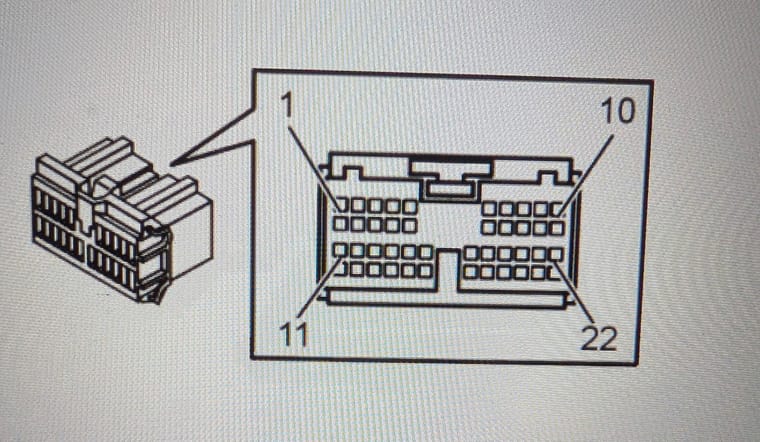
Evtl. kannst du da mal messen ob überhaupt was ankommt. -
Cleared maps on vDash but now can't get them back@Najkon That might be the problem here. Installing just the small maps doesn't seem to work. Don't ask me why.
Try the big maps for whole europe. At least it had to be done that way the last time I helped someone with an US to EU conversion. The small maps have not been recognized until the complete europe map were installed.