
@Usturmaca sind der Plus und Minuspol bei der neuen Batterie richtig herum? Entweder ist die neue Batterie defekt oder verkehrt rum gepolt.
Die Fehler sind alle wegen zu wenig Spannung oder Kurzschluss.
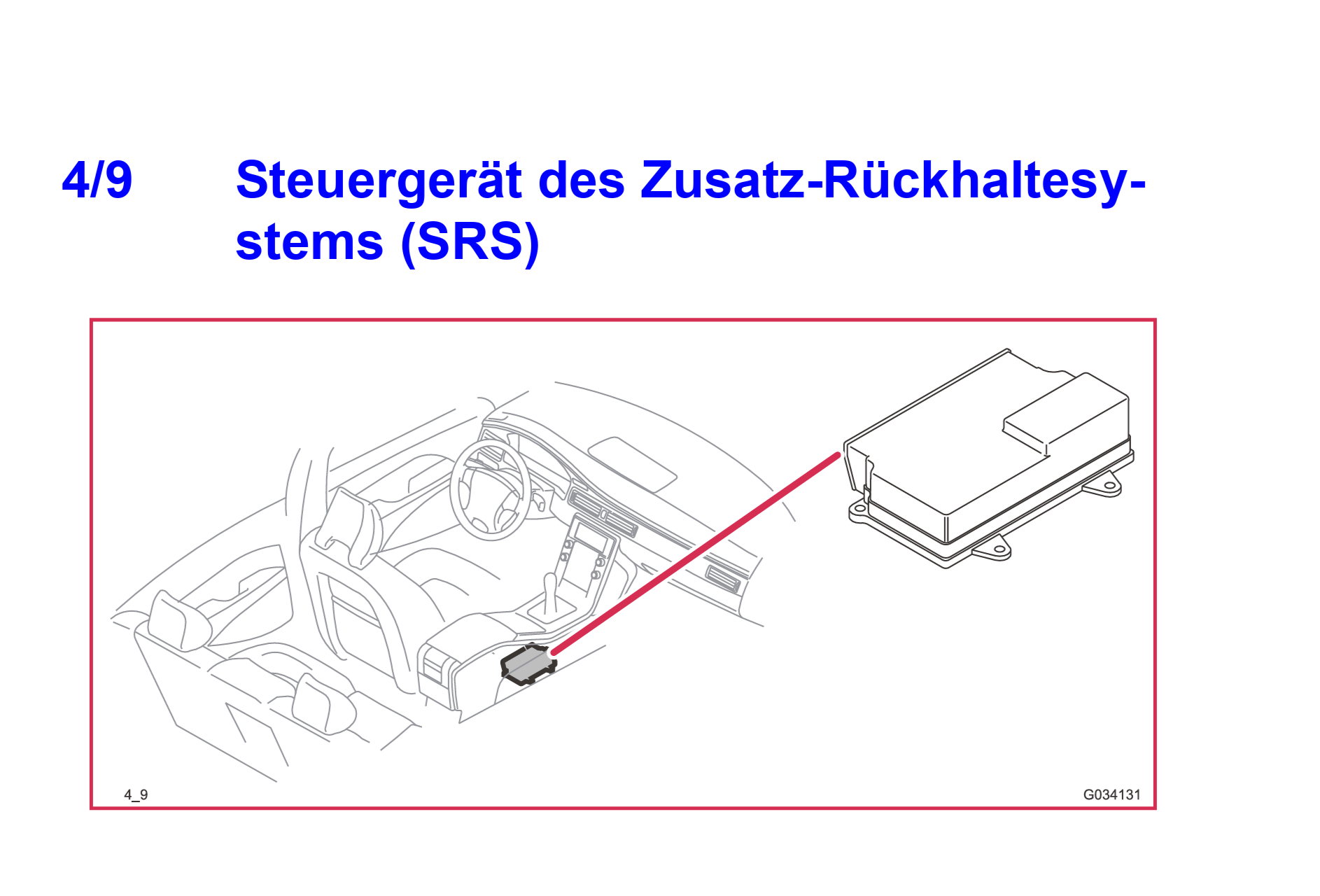
Wird das SRS Modul eigentlich immer noch in rot in Vdash angezeigt? Dann wäre nämlich mal ein genauer Blick auf dieses Teil angesagt. Das Teil sitzt unter der Mittelkonsole ziemlich genau unter den Becherhaltern. Wenn da mal was ausgelaufen ist, steht das Teil evtl. unter Wasser.
 T
T
T5 T6 Schnappi
@T5 T6 Schnappi
Posts
-
2015 Volvo V60 D3 – Airbag and ESC Warning Lights On -
CEM decode, TFT retrofit & dealership computer@Gir Then it's just the issues mentioned in the guide plus one more and really important thing. Whenever a software update or reload is performed with VIDA, all changes done with Vdash will be reverted. This means configuration changes as well as keys that have been added will be removed. Tunes will only be overwritten when a software update/reload is done for the ECM.
Reading just codes or activating service functions with VIDA will work without any problems.
So, if you want to bring the car to a dealer for a service or repair you have to tell them to not perform software updates without your explicit consent.
Vdash is usually able to reapply all configuration changes if the car has been resetted to the factory configuration due to a software update. As long as the VIN is still connected to the account all changes have been initially been done with, this should be even possible for free.
The CEM pin as well as all other pins are fixed for your VIN and won't change no matter what happens. Even if a pin protected module like the CEM or ECM has to be replaced. The original pin will be written into that module again when it gets programmed with VIDA. Any pin you have cracked will always stay the same. -
ICM Replace@Remusrahau to install used or new components of the Infotainment you first have to disable ITP (Infotainment Theft Protection). You can do this with Vdash after decoding the CEM pin, IMMO pin and ITP security PIN. Or if you have access to VIDA online you can simply download and install software with the part number 31268617(ITP off).
With ITP disabled you can install used modules without having to clone or program them as long as you keep ITP disabled. They should work as long they come from a donor car with similar configuration and modelyear than yours.
Or you can install new modules and clone software to them or program them with VIDA online.
ITP uses a VIN specific security pin which is programmed to all modules of the Infotainment and the CEM, and is send to the CEM everytime you turn on the ignition from every single module. If one or more modules sends the wrong or no pin, the whole Infotainment gets shut down immediately. This is why your new ICM doesn't turn on. Wrong ITP pin. -
SUPER J2534 cannot runing, windows 11 latest update@Herving Of course I tried it first before I posted it here. The AV warnings are false positives. The update file is a self extracting archive which just installs the drivers from a Mongoose Plus ISO 3 on your computer. There is nothing harmful about that. But many AVs consider downloading .exe files from Google Drive as being suspicious, and also the behavior of the file is similar to some simple viruses. It creates a folder on drive C:/ and runs a .bat script with admin rights to install a new driver.
You can open the .exe with lots of programs like Winrar, 7-Zip or TotalCommander for example and you will see these files
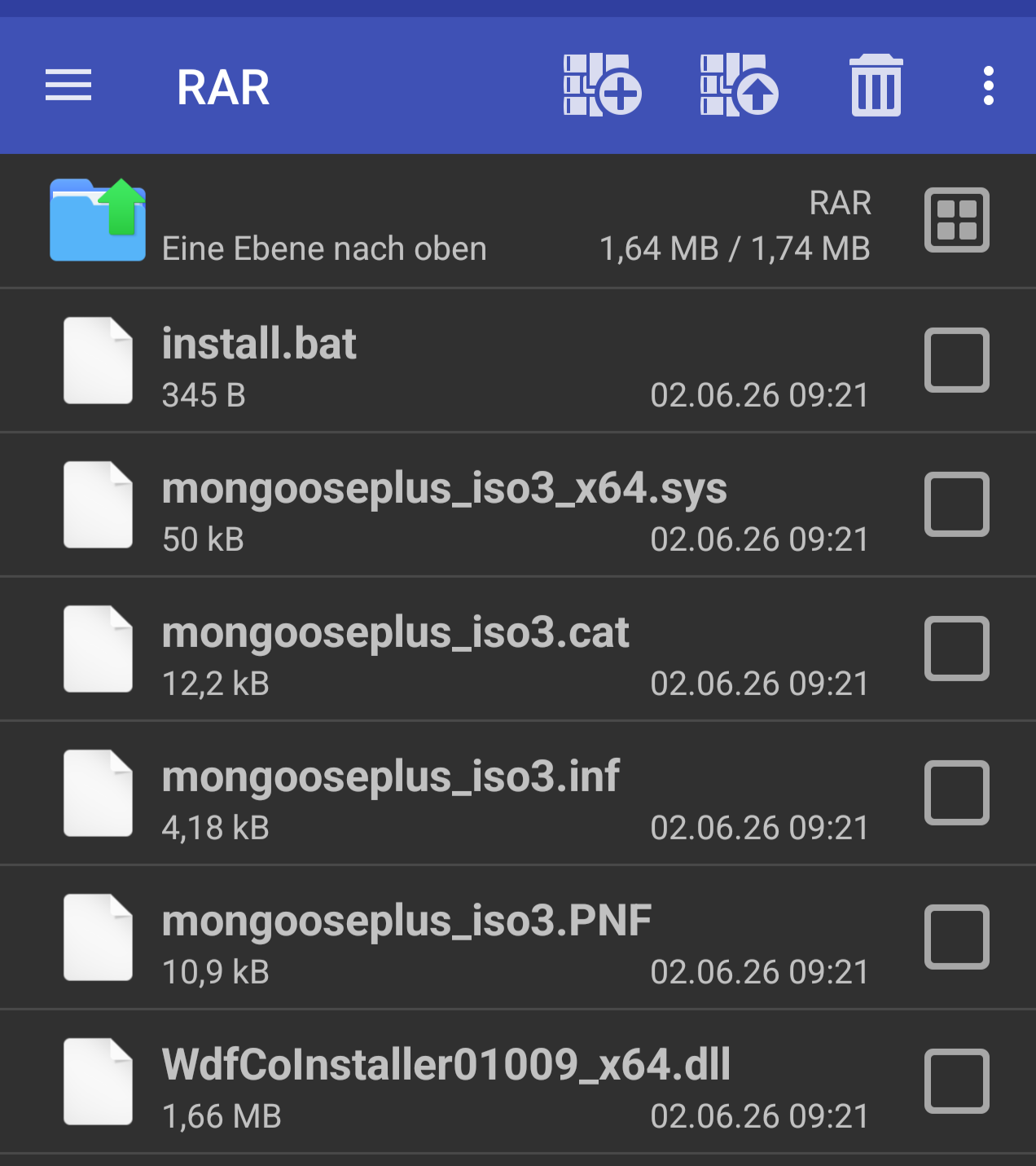
You can also simply unpack those files to a folder of your choice and run the .bat as administrator. The result will be exactly the same as running the exe.
If your AV allows to report false positives, you should report the file as being harmless. -
ICM Replace@Remusrahau Did you disable ITP? Any DTCs? Is the ICM shown in green, yellow or red when you connect Vdash?
-
CEM decode, TFT retrofit & dealership computer@Gir known issues are listed at the end of this guide.
And you need to use a DIM with white back cover and from a donor car with automatic transmission. DIMs with black back cover (from cars with VEA engine) won't work in your car. -
ETM Cloning Question@Zubecco ETM cloning is possible with Vdash.
You don't need any pin for this.
You just need to attach a good charger to the battery which is capable to maintain a constant load of 8-15 Ampere while reading/writing the software.
And you need a working and stable internet connection over the whole process.
After connecting Vdash you will find a cloning menu in the top right corner (ADVANCED clone/charts Button).
You basically connect the old ETM, make a backup of it's software, then connect the new ETM and upload the saved software to it. Done. Make sure that both parts have the same part/hardware number before you start.
Plan some time for this. The transfer speed for software is really low on PreFL P2s. And don't use a Vxdiag or Scanmatic adapter for this!
Cloning, or better said, restoring backups is a paid service. So you will need to add Credits(money) to your account through Vdash. This is done by clicking on the money logo in the top right corner. The amount needed should be shown in the clone assistent. The price should be 39 Euros+VAT if you use a credit card. Paypal will cost an extra fee.
While you're at it you should also crack your immo pin which only takes a few seconds. And you should make a backup of your UEM(rear view mirror) which contains your keyfob data. Just in case to have a backup when you might need it, especially if you have a sunroof. This part is infamous for damages through water ingress. Backups are usually free and will be stored on the Vdash servers. -
Error after headlight replacement@Zwergnase you will also need add the ABL switch to the center console.
-
Error after headlight replacement@Zwergnase The wiring diagrams for your car can be found here https://vidaresources.volvocars.biz/ewd/Eng/index.html
VIDA which has the pinouts for everything can be asked for in this thread https://forum.d5t5.com/topic/249/vida-2014d-2015a-windows-11
As your car already had Xenons you should already have the level sensors on the front and rear axle and also the connector and wiring for the HCM should be already present. You just need to find it. The location can be found in the EWD (wiring diagrams).
You might need another light switch module and you need to change your car configuration to active gas discharge headlights or something that sounds similar to this.
Try to find a used HCM from a S60/V70 with the same modelyear as your car so you won't need to visit a volvo dealer for a software reload after installation. -
FSM Code@akeker first of all. You have lots of low voltage errors. Replace both batteries first and perform a BMS reset afterwards.
To calibrate the FSM you need to drive the car for a while on a road with clearly visible markings and at good day light conditions after starting the calibration. That's it basically. It's also possible that your front radar needs a realignment. -
SUPER J2534 cannot runing, windows 11 latest update@EricJ here is solution that might work https://svdns.info/2026/06/02/broken-mongoose-superj2534-windows-driver-fix/
-
Driver MongoosePro JLR J2534 An Application Control policy has blocked this file.@aquarius here is an easier way https://svdns.info/2026/06/02/broken-mongoose-superj2534-windows-driver-fix/
-
2015 Volvo V60 D3 – Airbag and ESC Warning Lights On@Usturmaca https://www.volvocars.com/de/support/car/v60/14w46/article/ff809619edf78d3ac0a801e800f7b632/?search=Batterie&page=0
Ist eine normale AGM Motorrad Batterie. Maße stehen in der Anleitung. Müsste 12Ah haben. Die kann man tauschen ohne die Hauptbatterie abzuklemmen oder irgendwas zurück zu setzen. Einfach alte raus, neue rein.
Ist denn das SRS Modul wieder in Vdash zu sehen, oder ist es immer noch rot?
-
VIDA 2014D/2015A Windows 11@Mslacool VIDA is much more unintuitive and user unfriendly than Vdash. If you want an easy to use tool, you will need a Bluetooth OBD-adapter like a vLinker MC+ and mobile phone apps like "V-Tool" for modelyear 2005 and newer or "Car Scanner ELM OBD2" for 2004 and older. V-Tool allows you to read codes and access lots of service functions. Car Scanner reads codes and allows to reset the service reminder.
-
V90 VCM/LTE module cloning@krikke944 Not with Vdash. No idea if there are other possibilities.
-
Error after headlight replacement@Zwergnase The ABLs need the HCM module which isn't present on normal Xenons, additional wiring and a configuration change which requires the CEM pin.
-
2015 Volvo V60 D3 – Airbag and ESC Warning Lights On@Usturmaca Bevor du an die Sicherung gehst solltest du die Batterie abklemmen. Zündung muss vorm abklemmen min. 15 Minuten aus und der Schlüssel weit weg sein. Minuspol abklemmen reicht. Nach dem abklemmen nochmal min. 20 Minuten warten bevor du die Sicherung ziehst bzw. eine neue steckst. Ist eine 10A Sicherung.
Nach dem anklemmen der Batterie als erstes von außerhalb des Wagens hinterm Lenkrad vorbei greifen und die Zündung einmal kurz anmachen (lange auf den Start/Stop Knopf drücken ohne Fuß auf der Bremse). -
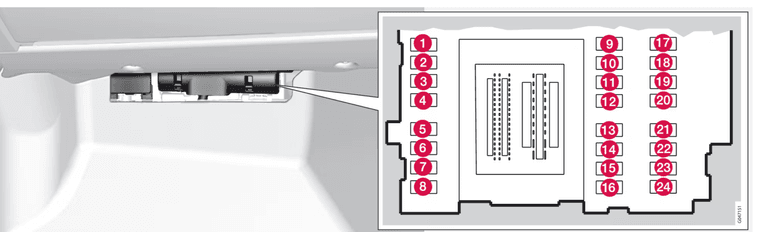
2015 Volvo V60 D3 – Airbag and ESC Warning Lights On@Usturmaca Sicherung Nr. 18
-
2015 Volvo V60 D3 – Airbag and ESC Warning Lights On@Usturmaca Moin!
Dein Wagen hat 2 Batterien. Wurden beide getauscht? Wurde der BMS reset richtig gemacht? Sprich Batterie vorm Einbau richtig voll laden, BMS zurücksetzen, Auto min. 4 Stunden verschlossen stehen lassen? Würde ich bei ATU ja eher verneinen. Die ganzen U-Fehler sind zu 99% wegen Unterspannung.
Schau dir außerdem die Sicherung fürs SRS/Airbagsteuergerät an. Die ist evtl. durch. Sollte hinterm Handschuhfach sitzen.
Grüße aus Berlin -
ALERT: downloaded VXDIAG and it had a Trojan inside@bochenn that's a trusted source for good adapters and also a Vdash Pro partner. So this adapter should be really good for P1, P2, P3 and also SPA cars.
